Some language models are too large to train on a single GPU. In addition to creating the model as a pipeline of stages, as in Pipeline Parallelism, you can split the model across multiple GPUs using Fully Sharded Data Parallelism (FSDP). In this article, you will learn how to use FSDP to split models for training. In particular, you will learn about:
- The idea of sharding and how FSDP works
- How to use FSDP in PyTorch
Let’s get started!

Train Your Large Model on Multiple GPUs with Fully Sharded Data Parallelism.
Photo by Ferenc Horvath. Some rights reserved.
Overview
This article is divided into five parts; they are:
- Introduction to Fully Sharded Data Parallel
- Preparing Model for FSDP Training
- Training Loop with FSDP
- Fine-Tuning FSDP Behavior
- Checkpointing FSDP Models
Introduction to Fully Sharded Data Parallel
Sharding is a term originally used in database management systems,
where it refers to dividing a database into smaller units, called
shards, to improve performance. In machine learning, sharding refers to
dividing model parameters across multiple devices. Unlike pipeline
parallelism, the shards contain only a portion of any complete
operation. For example, the nn.Linear module is essentially
a matrix multiplication. A sharded version of it contains only a
portion of the matrix. When a sharded module needs to process data, you
must gather the shards to create a complete matrix temporarily and
perform the operation. Afterwards, this matrix is discarded to reclaim
memory.
When you use FSDP, all model parameters are sharded, and each process holds exactly one shard. Unlike data parallelism, where each GPU has a full copy of the model and only data and gradient updates are synchronized across GPUs, FSDP does not keep a full copy of the model on each GPU; instead, both the model and the data are synchronized on every step. Therefore, FSDP incurs higher communication overhead in exchange for lower memory usage.
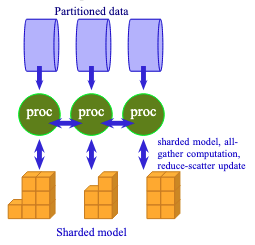
FSDP requires processes to exchange data to unshard the model.
The workflow of FSDP is as follows:
There will be multiple processes running together, possibly on
multiple machines across a network. Each process (equivalently, each
GPU) holds only one shard of the model. When the model is sharded, each
module’s weights are stored as a DTensor (distributed tensor, sharded across multiple GPUs) rather than a plain Tensor. Therefore, no process can run any module independently. Before each operation, FSDP issues an all-gather request to enable all processes to exchange a module’s shards with one another. This creates a temporary unsharded module,
and each process runs the forward pass on this module with its
micro-batch of data. Afterward, the unsharded module is discarded as the
processes move on to the next module in the model.
Similar operations happen in the backward pass. Each module must be unsharded when FSDP issues an all-gather request to it. Then the backward pass computes gradients from the forward pass results. Note that each process operates on a different micro-batch of data, so the gradients computed by each process are different. Therefore, FSDP issues a reduce-scatter request, causing all processes to exchange gradients so that the final batch-wide gradient is averaged. This final gradient is then used to update the model parameters on every shard.
As shown in the figure above, FSDP requires more communication and has a more complex workflow than plain data parallelism. Since the model is distributed across multiple GPUs, you do not need as much VRAM to host a very large model. This is the motivation for using FSDP for training.
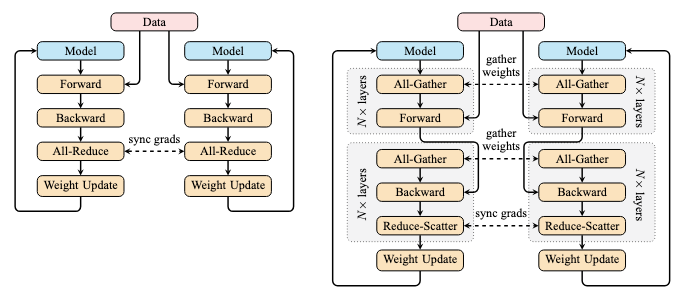
Comparing DP (left) and FSDP (right). Illustration adapted from the blog post by Ott et al.
To improve FSDP’s efficiency, PyTorch uses prefetching to overlap communication and computation. While your GPU computes the first module, the processes exchange shards from the second module, so the second module becomes available once the first is complete. This keeps both the GPU and the network busy, reducing per-step latency. Some tuning in FSDP can help you maximize such overlap and improve training throughput, often at the cost of higher memory usage.
Preparing Model for FSDP Training
When you need FSDP, usually it means your model is too large to fit
on a single GPU. One way to enable such a large model is to train it on a
fake device meta, then shard it and distribute the shards across multiple GPUs.
In PyTorch, you need to use the torchrun command to launch an FSDP training script with multiple processes. Under torchrun, each process will see the world size (total number of processes), its rank (the index of the current process), and its local rank (the index of the GPU device on the current machine). In the script, you need to initialize this as a process group:
import torch.distributed as dist # Initialize the distributed environment dist.init_process_group(backend="nccl") local_rank = int(os.environ["LOCAL_RANK"]) device = torch.device(f"cuda:{local_rank}") rank = dist.get_rank() world_size = dist.get_world_size() print(f"World size {world_size}, rank {rank}, local rank {local_rank}. Using {device}") |
Next, you should create the model and then shard it. The code below is based on the model architecture described in the previous post:
... from torch.distributed.fsdp import FSDPModule, fully_shard with torch.device("meta"): model_config = LlamaConfig() model = LlamaForPretraining(model_config) for layer in model.base_model.layers: fully_shard(layer) fully_shard(model.base_model) fully_shard(model) model.to_empty(device=device) model.reset_parameters() assert isinstance(model, FSDPModule), f"Expected FSDPModule, got {type(model)}" |
In PyTorch, you use the fully_shard() function to create a sharded model. This function replaces parameters of type Tensor with DTensor in-place. It also modifies the model to perform the all-gather operation before the actual computation.
You should notice that in the above, fully_shard() is not only called on model, but also on model.base_model as well as each transformer block in the base model. This needs careful consideration.
Usually, you do not want to shard only the top-level model, but also its submodules. When you do so, you must apply fully_shard()
from bottom up, with the top-level model being sharded last. Each
sharded module will be one unit of all-gather. In the design shown
above, when you pass a tensor to model, the top-level model
components will be unsharded, except for those that were sharded
separately. Since it is a decoder-only transformer model, the input
should be processed by the base model first, then the prediction head in
the top model. FSDP will unshard the base model, except for each
repeating transformer block. This includes the input embedding layer,
which is the first operation applied to the input tensor.
After the embedding layer, the input tensor should be processed by a sequence of transformer blocks. Each block is sharded separately, so all-gather is triggered for each block. The block transforms the input and passes it on to the next transformer block. After the last transformer block, the RMS norm layer in the base model, which is already unsharded, processes the output before returning to the top model for the prediction.
This is why you do not want to shard the top-level model: if you do, the all-gather operation will create a full model on each GPU, violating the assumption that each GPU has insufficient memory to support the full model. In that case, you should use plain data parallelism rather than FSDP.
In this design, each GPU requires one complete transformer block,
along with the other modules in the top and base models, such as the
embedding layer, the final RMS norm layer in the base model, and the
prediction head in the top model. You can revise this design (for
example, by further sharding model.base_model.embed_tokens and breaking down each transformer block into attention and feed-forward sublayers) to further reduce the memory requirement.
After you have the sharded model, you can transfer it from a meta device to your local GPU with model.to_empty(device=device).
You also need to reset the weights of the newly created model (unless
you want to initialize them from a checkpoint). You can borrow the
function reset_all_weights() from the previous post to reset the weights. Here is another way that uses model.reset_parameters(). This requires you to implement the corresponding member function in each module:
class LlamaAttention(nn.Module): """Grouped-query attention with rotary embeddings.""" def __init__(self, config: LlamaConfig) -> None: super().__init__() self.hidden_size = config.hidden_size self.num_heads = config.num_attention_heads self.head_dim = self.hidden_size // self.num_heads self.num_kv_heads = config.num_key_value_heads # GQA: H_kv < H_q # Linear layers for Q, K, V projections self.q_proj = nn.Linear(self.hidden_size, self.num_heads * self.head_dim, bias=False) self.k_proj = nn.Linear(self.hidden_size, self.num_kv_heads * self.head_dim, bias=False) self.v_proj = nn.Linear(self.hidden_size, self.num_kv_heads * self.head_dim, bias=False) self.o_proj = nn.Linear(self.num_heads * self.head_dim, self.hidden_size, bias=False) def reset_parameters(self): self.q_proj.reset_parameters() self.k_proj.reset_parameters() self.v_proj.reset_parameters() self.o_proj.reset_parameters() def forward(self, hidden_states: Tensor, rope: RotaryPositionEncoding, attn_mask: Tensor) -> Tensor: ... class LlamaMLP(nn.Module): """Feed-forward network with SwiGLU activation.""" def __init__(self, config: LlamaConfig) -> None: super().__init__() # Two parallel projections for SwiGLU self.gate_proj = nn.Linear(config.hidden_size, config.intermediate_size, bias=False) self.up_proj = nn.Linear(config.hidden_size, config.intermediate_size, bias=False) self.act_fn = F.silu # SwiGLU activation function # Project back to hidden size self.down_proj = nn.Linear(config.intermediate_size, config.hidden_size, bias=False) def reset_parameters(self): self.gate_proj.reset_parameters() self.up_proj.reset_parameters() self.down_proj.reset_parameters() def forward(self, x: Tensor) -> Tensor: ... class LlamaDecoderLayer(nn.Module): """Single transformer layer for a Llama model.""" def __init__(self, config: LlamaConfig) -> None: super().__init__() self.input_layernorm = nn.RMSNorm(config.hidden_size, eps=1e-5) self.self_attn = LlamaAttention(config) self.post_attention_layernorm = nn.RMSNorm(config.hidden_size, eps=1e-5) self.mlp = LlamaMLP(config) def reset_parameters(self): self.input_layernorm.reset_parameters() self.self_attn.reset_parameters() self.post_attention_layernorm.reset_parameters() self.mlp.reset_parameters() def forward(self, hidden_states: Tensor, rope: RotaryPositionEncoding, attn_mask: Tensor) -> Tensor: ... class LlamaModel(nn.Module): """The full Llama model without any pretraining heads.""" def __init__(self, config: LlamaConfig) -> None: super().__init__() self.rotary_emb = RotaryPositionEncoding( config.hidden_size // config.num_attention_heads, config.max_position_embeddings, ) self.embed_tokens = nn.Embedding(config.vocab_size, config.hidden_size) self.layers = nn.ModuleList([ LlamaDecoderLayer(config) for _ in range(config.num_hidden_layers) ]) self.norm = nn.RMSNorm(config.hidden_size, eps=1e-5) def reset_parameters(self): self.embed_tokens.reset_parameters() for layer in self.layers: layer.reset_parameters() self.norm.reset_parameters() def forward(self, input_ids: Tensor, attn_mask: Tensor) -> Tensor: ... class LlamaForPretraining(nn.Module): def __init__(self, config: LlamaConfig) -> None: super().__init__() self.base_model = LlamaModel(config) self.lm_head = nn.Linear(config.hidden_size, config.vocab_size, bias=False) def reset_parameters(self): self.base_model.reset_parameters() self.lm_head.reset_parameters() def forward(self, input_ids: Tensor, attn_mask: Tensor) -> Tensor: ... |
You know the model is sharded if it is an instance of FSDPModule. Subsequently, you can create the optimizer and other training components as usual. The PyTorch optimizer supports updating DTensor objects the same way as plain Tensor objects.
Training Loop with FSDP
Using FSDP is straightforward. Virtually nothing needs to be changed in the training loop:
... optimizer = torch.optim.AdamW( model.parameters(), lr=learning_rate, betas=(0.9, 0.99), eps=1e-8, weight_decay=0.1, ) warmup_scheduler = lr_scheduler.LinearLR( optimizer, start_factor=0.1, end_factor=1.0, total_iters=num_warmup_steps, ) cosine_scheduler = lr_scheduler.CosineAnnealingLR( optimizer, T_max=num_training_steps - num_warmup_steps, eta_min=0, ) scheduler = lr_scheduler.SequentialLR( optimizer, schedulers=[warmup_scheduler, cosine_scheduler], milestones=[num_warmup_steps], ) loss_fn = nn.CrossEntropyLoss(ignore_index=PAD_TOKEN_ID) # Start training loop for epoch in range(epochs): pbar = tqdm.tqdm(dataloader, desc=f"Epoch {epoch+1}/{epochs}") for batch_id, batch in enumerate(pbar): # Explicit prefetching before sending any data to model model.unshard() # Get batched data, move from CPU to GPU input_ids, target_ids = batch input_ids = input_ids.to(device) target_ids = target_ids.to(device) # create attention mask: causal mask + padding mask attn_mask = create_causal_mask(input_ids) + \ create_padding_mask(input_ids, PAD_TOKEN_ID) # Extract output from model logits = model(input_ids, attn_mask) # Compute loss: cross-entropy between logits and target, ignoring padding tokens loss = loss_fn(logits.view(-1, logits.size(-1)), target_ids.view(-1)) # Backward with loss and gradient clipping by L2 norm to 1.0 # Optimizer and gradient clipping works on DTensor optimizer.zero_grad() loss.backward() torch.nn.utils.clip_grad_norm_(model.parameters(), 1.0) optimizer.step() scheduler.step() pbar.set_postfix(loss=loss.item()) pbar.update(1) pbar.close() |
The only change you can observe is the use of model.unshard() to trigger the all-gather before the forward pass, but this is optional. Even if you do not call it, model(input_ids, attn_mask)
will still trigger the all-gather operation internally. This line
starts the all-gather before the input tensor is prepared for the
forward pass.
However, FSDP is partially a data parallelism technique. As with distributed data parallelism, you should use a sampler with your data loader so that each rank in the process group processes a different micro-batch. This works because each process receives a complete module of the model via all-gather, so each process can use that module to process a different micro-batch of data. In essence, FSDP exchanges both the model and the training data, going one step further than data parallelism. Below is how you should set up your data loader:
... dataset = PretrainingDataset(dataset, tokenizer, seq_length) sampler = DistributedSampler(dataset, shuffle=False) dataloader = torch.utils.data.DataLoader( dataset, batch_size=batch_size, sampler=sampler, pin_memory=True, # optional shuffle=False, num_workers=2, prefetch_factor=2, ) |
This is the same as how you set up the data loader for distributed data parallel in the previous article.
Fine-Tuning FSDP Behavior
The above is all you need to run FSDP training. However, you can introduce variations to fine-tune FSDP’s behavior.
Using torch.compile()
If your model can be compiled, you can also compile an FSDP model. However, you need to compile it after sharding the model, so the compiled model can reference the distributed tensors rather than plain tensors.
... # create sharded model first fully_shard(model) model.to_empty(device=device) model.reset_parameters() ... # create data loader, optimizer, scheduler, loss function for the training loop # then create compiled version model = torch.compile(model) loss_fn = torch.compile(loss_fn) # Start training loop for epoch in range(epochs): for batch in dataloader: ... logits = model(input_ids, attn_mask) loss = loss_fn(logits.view(-1, logits.size(-1)), target_ids.view(-1)) optimizer.zero_grad() loss.backward() torch.nn.utils.clip_grad_norm_(model.parameters(), 1.0) optimizer.step() |
Arguments to fully_shard()
Recall that you can use torch.autocast() to run mixed precision training.
You can also enable mixed-precision training in FSDP, but you must
apply it when sharding the model. The change needed is particularly
simple:
... from torch.distributed.fsdp import MixedPrecisionPolicy, fully_shard with torch.device("meta"): model_config = LlamaConfig() model = LlamaForPretraining(model_config) mp_policy = MixedPrecisionPolicy( param_dtype=torch.bfloat16, reduce_dtype=torch.float32, ) for layer in model.base_model.layers: fully_shard(layer, mp_policy=mp_policy) fully_shard(model.base_model, mp_policy=mp_policy) fully_shard(model, mp_policy=mp_policy) model.to_empty(device=device) |
When you shard the model, you can specify the argument mp_policy
to describe exactly how the mixed precision training should be
performed. In the example above, you keep the model parameters in
bfloat16, but use float32 for gradients (during scatter-reduce). You can
also specify output_dtype and cast_forward_inputs to define the data types of the forward pass inputs and outputs. Note that since fully_shard() is applied to each module, you are free to use different mixed precision policies for different modules.
Of course, PyTorch still allows you to use torch.set_default_dtype(torch.bfloat16) to change the default data type for the entire model. This changes the default data type for all DTensor objects created.
In FSDP, you need an all-gather step before the actual forward or backward computation. Before all-gather, you do not have a complete parameter for the operation. Since inter-process communication is slow and a lot of data needs to be moved to the GPU anyway, you can apply CPU offloading to keep your sharded model in CPU memory when it is not in use. This means:
... from torch.distributed.fsdp import MixedPrecisionPolicy, CPUOffloadPolicy, fully_shard with torch.device("meta"): model_config = LlamaConfig() model = LlamaForPretraining(model_config) mp_policy = MixedPrecisionPolicy( param_dtype=torch.bfloat16, reduce_dtype=torch.float32, ) offload_policy = CPUOffloadPolicy(pin_memory=True) for layer in model.base_model.layers: fully_shard(layer, mp_policy=mp_policy, offload_policy=offload_policy) fully_shard(model.base_model, mp_policy=mp_policy, offload_policy=offload_policy) fully_shard(model, mp_policy=mp_policy, offload_policy=offload_policy) model.to_empty(device="cpu") |
Typically, using CPU offloading makes the training loop
noticeably slower. If you use CPU offloading, you should consider
changing the training loop such that the optimizer zeros out gradient
tensors instead of setting the gradients to None:
... for batch_id, batch in enumerate(pbar): ... logits = model(input_ids, attn_mask) loss = loss_fn(logits.view(-1, logits.size(-1)), target_ids.view(-1)) optimizer.zero_grad(set_to_none=False) # retain allocated grad tensor loss.backward() optimizer.step() ... |
This is because CPU memory is usually more abundant than GPU memory, and you can afford to keep the allocated gradient tensors in memory to avoid the overhead of re-allocating them.
The third argument you can add to fully_shard() is reshard_after_forward=True. By default (reshard_after_forward=None),
FSDP will keep the unsharded model in the memory of the root module
after the forward pass, so the backward pass does not need to call
all-gather again. Non-root modules will always discard the unsharded
tensors, unless you set reshard_after_forward=False.
Usually, you do not want to change this setting, since this likely
means you need to run all-gather immediately after discarding the
unsharded tensors. But understanding how this parameter works lets you
reconsider your model design: In the implementation of LlamaForPretraining above, the root module contains only the prediction head. But if you move the embedding layer from the base model LlamaModel
to the root model, you will keep the embedding layer (which is usually
large) in memory for a long time. This is the model engineering you can
consider when applying FSDP.
Gradient Checkpointing
FSDP has a lower memory requirement than plain data parallelism. If you want to reduce memory usage further, you can use gradient checkpointing with FSDP. Unlike the plain model, you do not use torch.utils.checkpoint.checkpoint() to wrap the part that requires gradient checkpointing. Instead, you set a policy and apply it to the sharded model:
... import functools from torch.distributed.algorithms._checkpoint.checkpoint_wrapper import ( apply_activation_checkpointing, checkpoint_wrapper, ) from torch.distributed.fsdp.wrap import transformer_auto_wrap_policy wrap_policy = functools.partial( transformer_auto_wrap_policy, transformer_layer_cls={LlamaDecoderLayer, nn.Embedding}, ) apply_activation_checkpointing( model, checkpoint_wrapper_fn=checkpoint_wrapper, auto_wrap_policy=wrap_policy, ) |
The wrap_policy is a helper function that checks
whether the module belongs to one of the listed classes. If so,
gradient checkpointing will be applied to it, so its internal
activations are discarded after the forward pass and recomputed during
the backward pass. The function apply_activation_checkpointing() recursively scans the module and applies gradient checkpointing to its submodules.
As a reminder, gradient checkpointing is a technique that trades time for memory during training. You save memory by discarding intermediate activations, but the backward pass is slower due to recomputation.
All-Gather Prefetching
FSDP implements a similar efficiency optimization to pipeline parallelism: it issues an all-gather request to the next module while the current module is processing data. This is called prefetching, and it deliberately overlaps communication and computation to reduce the latency of each training step.
You can indeed control how the prefetching is performed. Below is an example:
... num_prefetch = 2 modules = list(model.base_model.layers) for i, module in enumerate(modules): if i == len(modules) - 1: break module.set_modules_to_forward_prefetch(modules[i+1:i+num_prefetch+1]) for i, module in enumerate(modules): if i == 0: continue module.set_modules_to_backward_prefetch(modules[max(0, i-num_prefetch):i]) |
By default, FSDP determines the next module and prefetches
it. The code above causes FSDP to prefetch not the next item but two
items ahead. The modules list enumerates the sharded modules in the model in their execution order.
Then, for each module, you set the forward prefetch to two subsequent
modules and the backward prefetch to two preceding modules.
Note that FSDP will not check if you specify them in the correct
execution order. If you prefetch the wrong module, your training
performance will deteriorate. But you also must not specify a module
that is not sharded (such as model.lm_head in the example above) as FSDP will not be able to issue all-gather requests for it.
Checkpointing FSDP Models
FSDP model is still a PyTorch model, but with the model weights replaced by DTensor objects. If you want to, you can still manipulate the DTensor objects like a Tensor object, as the optimizer would do in your training loop. You can also check the DTensor objects to see what is in each shard:
... from torch.distributed.fsdp import FSDPModule from torch.distributed.tensor import Shard # Expect the model object to be both FSDPModule type and the original model type assert isinstance(model, FSDPModule) assert isinstance(model, LlamaForPretraining) rank = torch.distributed.get_rank() for param in model.parameters(): # DTensors should have a placement assert param.placements == (Shard(rank),) # DTensors has the same dtype as the original tensor assert param.dtype == torch.float32 # You can see what is in this shard print(param.get_local_tensor()) |
You can use this property to save and load a sharded model. However, you must ensure that only one process is saving the model so that you do not overwrite the file on disk:
# Save model on rank 0 (the master process) if torch.distributed.get_rank() == 0: sharded_state_dict = model.state_dict() # map to DTensor full_state_dict = {} # map to plain Tensor on CPU for param_name, sharded_param in sharded_state_dict.items(): full_param = sharded_param.full_tensor() full_state_dict[param_name] = full_param.cpu() torch.save(full_state_dict, "model.pth") # Load model on all processes together from torch.distributed.tensor import distribute_tensor dist.barrier() full_state_dict = torch.load("model.pth", map_location="cpu", mmap=True) meta_sharded_state_dict = model.state_dict() # FSDPModule on meta device sharded_state_dict = {} for param_name, full_tensor in full_state_dict.items(): # create new DTensor, reusing the device mesh and placement as fully_shard() assigned sharded_meta_param = meta_sharded_state_dict.get(param_name) dtensor = distribute_tensor( full_tensor, sharded_meta_param.device_mesh, sharded_meta_param.placements, ) sharded_state_dict[param_name] = nn.Parameter(dtensor) # must use `assign=True` to replace tensor on meta device with actual DTensor model.load_state_dict(sharded_state_dict, strict=False, assign=True) dist.barrier() |
Indeed, there is an easier method: The distributed checkpointing API, as you have already seen in the previous article:
... from torch.distributed.checkpoint import load, save from torch.distributed.checkpoint.state_dict import get_state_dict, set_state_dict, StateDictOptions def save_checkpoint(model, optimizer): dist.barrier() model_state, optimizer_state = get_state_dict( model, optimizer, options=StateDictOptions(full_state_dict=True, cpu_offload=True) ) save( {"model": model_state, "optimizer": optimizer_state}, checkpoint_id="checkpoint-dist", # each rank will save its own file ) dist.barrier() def load_checkpoint(model, optimizer): dist.barrier() model_state, optimizer_state = get_state_dict( model, optimizer, options=StateDictOptions(full_state_dict=True, cpu_offload=True) ) load( {"model": model_state, "optimizer": optimizer_state}, checkpoint_id="checkpoint-dist" # each rank will load its own file ) # necessary if model.load_state_dict() should be called set_state_dict( model, optimizer, model_state_dict=model_state, optim_state_dict=optimizer_state, options=StateDictOptions(broadcast_from_rank0=True, full_state_dict=True, cpu_offload=True) ) dist.barrier() |
The cpu_offload option must be removed if you do not use CPU offloading.
These two functions are supposed to be called by all processes
together. Each process will save its own sharded model and optimizer
state to a different file, all under the same directory as the checkpoint_id you specified. Do not attempt to read them with torch.load() since these files are in a different format. However, you can still use the same load_checkpoint()
function above on an unsharded model in a plain Python script. Usually,
after training is completed, you can recreate the model file from
sharded checkpoints:
... model = LlamaForPretraining(model_config) # unsharded model optimizer = torch.optim.AdamW(model.parameters(), lr=1e-4) load_checkpoint(model, optimizer) torch.save(model.state_dict(), "model.pth") |
For completeness, below is the full script that you can run FSDP training:
import dataclasses import functools import os import datasets import tokenizers import torch import torch.distributed as dist import torch.nn as nn import torch.nn.functional as F import torch.optim.lr_scheduler as lr_scheduler import tqdm from torch import Tensor from torch.distributed.algorithms._checkpoint.checkpoint_wrapper import ( apply_activation_checkpointing, checkpoint_wrapper, ) from torch.distributed.checkpoint import load, save from torch.distributed.checkpoint.state_dict import ( StateDictOptions, get_state_dict, set_state_dict, ) from torch.distributed.fsdp import ( CPUOffloadPolicy, FSDPModule, MixedPrecisionPolicy, fully_shard, ) from torch.distributed.fsdp.wrap import transformer_auto_wrap_policy from torch.utils.data.distributed import DistributedSampler # Build the model @dataclasses.dataclass class LlamaConfig: """Define Llama model hyperparameters.""" vocab_size: int = 50000 # Size of the tokenizer vocabulary max_position_embeddings: int = 2048 # Maximum sequence length hidden_size: int = 768 # Dimension of hidden layers intermediate_size: int = 4*768 # Dimension of MLP's hidden layer num_hidden_layers: int = 12 # Number of transformer layers num_attention_heads: int = 12 # Number of attention heads num_key_value_heads: int = 3 # Number of key-value heads for GQA class RotaryPositionEncoding(nn.Module): """Rotary position encoding.""" def __init__(self, dim: int, max_position_embeddings: int) -> None: """Initialize the RotaryPositionEncoding module. Args: dim: The hidden dimension of the input tensor to which RoPE is applied max_position_embeddings: The maximum sequence length of the input tensor """ super().__init__() self.dim = dim self.max_position_embeddings = max_position_embeddings # compute a matrix of n\theta_i N = 10_000.0 inv_freq = 1.0 / (N ** (torch.arange(0, dim, 2) / dim)) inv_freq = torch.cat((inv_freq, inv_freq), dim=-1) position = torch.arange(max_position_embeddings) sinusoid_inp = torch.outer(position, inv_freq) # save cosine and sine matrices as buffers, not parameters self.register_buffer("cos", sinusoid_inp.cos()) self.register_buffer("sin", sinusoid_inp.sin()) def forward(self, x: Tensor) -> Tensor: """Apply RoPE to tensor x. Args: x: Input tensor of shape (batch_size, seq_length, num_heads, head_dim) Returns: Output tensor of shape (batch_size, seq_length, num_heads, head_dim) """ batch_size, seq_len, num_heads, head_dim = x.shape device = x.device dtype = x.dtype # transform the cosine and sine matrices to 4D tensor and the same dtype as x cos = self.cos.to(device, dtype)[:seq_len].view(1, seq_len, 1, -1) sin = self.sin.to(device, dtype)[:seq_len].view(1, seq_len, 1, -1) # apply RoPE to x x1, x2 = x.chunk(2, dim=-1) rotated = torch.cat((-x2, x1), dim=-1) output = (x * cos) + (rotated * sin) return output class LlamaAttention(nn.Module): """Grouped-query attention with rotary embeddings.""" def __init__(self, config: LlamaConfig) -> None: super().__init__() self.hidden_size = config.hidden_size self.num_heads = config.num_attention_heads self.head_dim = self.hidden_size // self.num_heads self.num_kv_heads = config.num_key_value_heads # GQA: H_kv < H_q # hidden_size must be divisible by num_heads assert (self.head_dim * self.num_heads) == self.hidden_size # Linear layers for Q, K, V projections self.q_proj = nn.Linear(self.hidden_size, self.num_heads * self.head_dim, bias=False) self.k_proj = nn.Linear(self.hidden_size, self.num_kv_heads * self.head_dim, bias=False) self.v_proj = nn.Linear(self.hidden_size, self.num_kv_heads * self.head_dim, bias=False) self.o_proj = nn.Linear(self.num_heads * self.head_dim, self.hidden_size, bias=False) def reset_parameters(self): self.q_proj.reset_parameters() self.k_proj.reset_parameters() self.v_proj.reset_parameters() self.o_proj.reset_parameters() def forward(self, hidden_states: Tensor, rope: RotaryPositionEncoding, attn_mask: Tensor) -> Tensor: bs, seq_len, dim = hidden_states.size() # Project inputs to Q, K, V query_states = self.q_proj(hidden_states).view(bs, seq_len, self.num_heads, self.head_dim) key_states = self.k_proj(hidden_states).view(bs, seq_len, self.num_kv_heads, self.head_dim) value_states = self.v_proj(hidden_states).view(bs, seq_len, self.num_kv_heads, self.head_dim) # Apply rotary position embeddings query_states = rope(query_states) key_states = rope(key_states) # Transpose tensors from BSHD to BHSD dimension for scaled_dot_product_attention query_states = query_states.transpose(1, 2) key_states = key_states.transpose(1, 2) value_states = value_states.transpose(1, 2) # Use PyTorch's optimized attention implementation # setting is_causal=True is incompatible with setting explicit attention mask attn_output = F.scaled_dot_product_attention( query_states, key_states, value_states, attn_mask=attn_mask, dropout_p=0.0, enable_gqa=True, ) # Transpose output tensor from BHSD to BSHD dimension, reshape to 3D, and then project output attn_output = attn_output.transpose(1, 2).reshape(bs, seq_len, self.hidden_size) attn_output = self.o_proj(attn_output) return attn_output class LlamaMLP(nn.Module): """Feed-forward network with SwiGLU activation.""" def __init__(self, config: LlamaConfig) -> None: super().__init__() # Two parallel projections for SwiGLU self.gate_proj = nn.Linear(config.hidden_size, config.intermediate_size, bias=False) self.up_proj = nn.Linear(config.hidden_size, config.intermediate_size, bias=False) self.act_fn = F.silu # SwiGLU activation function # Project back to hidden size self.down_proj = nn.Linear(config.intermediate_size, config.hidden_size, bias=False) def reset_parameters(self): self.gate_proj.reset_parameters() self.up_proj.reset_parameters() self.down_proj.reset_parameters() def forward(self, x: Tensor) -> Tensor: # SwiGLU activation: multiply gate and up-projected inputs gate = self.act_fn(self.gate_proj(x)) up = self.up_proj(x) return self.down_proj(gate * up) class LlamaDecoderLayer(nn.Module): """Single transformer layer for a Llama model.""" def __init__(self, config: LlamaConfig) -> None: super().__init__() self.input_layernorm = nn.RMSNorm(config.hidden_size, eps=1e-5) self.self_attn = LlamaAttention(config) self.post_attention_layernorm = nn.RMSNorm(config.hidden_size, eps=1e-5) self.mlp = LlamaMLP(config) def reset_parameters(self): self.input_layernorm.reset_parameters() self.self_attn.reset_parameters() self.post_attention_layernorm.reset_parameters() self.mlp.reset_parameters() def forward(self, hidden_states: Tensor, rope: RotaryPositionEncoding, attn_mask: Tensor) -> Tensor: # First residual block: Self-attention residual = hidden_states hidden_states = self.input_layernorm(hidden_states) attn_outputs = self.self_attn(hidden_states, rope=rope, attn_mask=attn_mask) hidden_states = attn_outputs + residual # Second residual block: MLP residual = hidden_states hidden_states = self.post_attention_layernorm(hidden_states) hidden_states = self.mlp(hidden_states) + residual return hidden_states class LlamaModel(nn.Module): """The full Llama model without any pretraining heads.""" def __init__(self, config: LlamaConfig) -> None: super().__init__() self.rotary_emb = RotaryPositionEncoding( config.hidden_size // config.num_attention_heads, config.max_position_embeddings, ) self.embed_tokens = nn.Embedding(config.vocab_size, config.hidden_size) self.layers = nn.ModuleList([ LlamaDecoderLayer(config) for _ in range(config.num_hidden_layers) ]) self.norm = nn.RMSNorm(config.hidden_size, eps=1e-5) def reset_parameters(self): self.embed_tokens.reset_parameters() for layer in self.layers: layer.reset_parameters() self.norm.reset_parameters() def forward(self, input_ids: Tensor, attn_mask: Tensor) -> Tensor: # Convert input token IDs to embeddings hidden_states = self.embed_tokens(input_ids) # Process through all transformer layers, then the final norm layer for layer in self.layers: hidden_states = layer(hidden_states, rope=self.rotary_emb, attn_mask=attn_mask) hidden_states = self.norm(hidden_states) # Return the final hidden states return hidden_states class LlamaForPretraining(nn.Module): def __init__(self, config: LlamaConfig) -> None: super().__init__() self.base_model = LlamaModel(config) self.lm_head = nn.Linear(config.hidden_size, config.vocab_size, bias=False) def reset_parameters(self): self.base_model.reset_parameters() self.lm_head.reset_parameters() def forward(self, input_ids: Tensor, attn_mask: Tensor) -> Tensor: hidden_states = self.base_model(input_ids, attn_mask) return self.lm_head(hidden_states) def create_causal_mask(batch: Tensor, dtype: torch.dtype = torch.float32) -> Tensor: """Create a causal mask for self-attention. Args: batch: Batch of sequences, shape (batch_size, seq_len) dtype: Data type of the mask Returns: Causal mask of shape (seq_len, seq_len) """ batch_size, seq_len = batch.shape mask = torch.full((seq_len, seq_len), float("-inf"), device=batch.device, dtype=dtype) \ .triu(diagonal=1) return mask def create_padding_mask(batch: Tensor, padding_token_id: int, dtype: torch.dtype = torch.float32) -> Tensor: """Create a padding mask for a batch of sequences for self-attention. Args: batch: Batch of sequences, shape (batch_size, seq_len) padding_token_id: ID of the padding token dtype: Data type of the mask Returns: Padding mask of shape (batch_size, 1, seq_len, seq_len) """ padded = torch.zeros_like(batch, device=batch.device, dtype=dtype) \ .masked_fill(batch == padding_token_id, float("-inf")) mask = padded[:,:,None] + padded[:,None,:] return mask[:, None, :, :] # Generator function to create padded sequences of fixed length class PretrainingDataset(torch.utils.data.Dataset): def __init__(self, dataset: datasets.Dataset, tokenizer: tokenizers.Tokenizer, seq_length: int): self.dataset = dataset self.tokenizer = tokenizer self.seq_length = seq_length self.bot = tokenizer.token_to_id("[BOT]") self.eot = tokenizer.token_to_id("[EOT]") self.pad = tokenizer.token_to_id("[PAD]") def __len__(self): return len(self.dataset) def __getitem__(self, index: int) -> tuple[Tensor, Tensor]: """Get a sequence of token ids from the dataset. [BOT] and [EOT] tokens are added. Clipped and padded to the sequence length. """ seq = self.dataset[index]["text"] tokens: list[int] = [self.bot] + self.tokenizer.encode(seq).ids + [self.eot] # pad to target sequence length toklen = len(tokens) if toklen < self.seq_length+1: pad_length = self.seq_length+1 - toklen tokens += [self.pad] * pad_length # return the sequence x = torch.tensor(tokens[:self.seq_length], dtype=torch.int64) y = torch.tensor(tokens[1:self.seq_length+1], dtype=torch.int64) return x, y def load_checkpoint(model: nn.Module, optimizer: torch.optim.Optimizer, scheduler: lr_scheduler.SequentialLR) -> None: dist.barrier() model_state, optimizer_state = get_state_dict( model, optimizer, options=StateDictOptions(full_state_dict=True, cpu_offload=cpu_offload), ) load( {"model": model_state, "optimizer": optimizer_state}, checkpoint_id="checkpoint-dist", ) set_state_dict( model, optimizer, model_state_dict=model_state, optim_state_dict=optimizer_state, options=StateDictOptions(broadcast_from_rank0=True, full_state_dict=True, cpu_offload=cpu_offload), ) scheduler.load_state_dict( torch.load("checkpoint-dist/lrscheduler.pt", map_location=device), ) dist.barrier() def save_checkpoint(model: nn.Module, optimizer: torch.optim.Optimizer, scheduler: lr_scheduler.SequentialLR) -> None: dist.barrier() model_state, optimizer_state = get_state_dict( model, optimizer, options=StateDictOptions(full_state_dict=True, cpu_offload=cpu_offload), ) save( {"model": model_state, "optimizer": optimizer_state}, checkpoint_id="checkpoint-dist", ) if dist.get_rank() == 0: torch.save(scheduler.state_dict(), "checkpoint-dist/lrscheduler.pt") dist.barrier() # Load the tokenizer and dataset tokenizer = tokenizers.Tokenizer.from_file("bpe_50K.json") dataset = datasets.load_dataset("HuggingFaceFW/fineweb", "sample-10BT", split="train") # Initialize the distributed environment dist.init_process_group(backend="nccl") local_rank = int(os.environ["LOCAL_RANK"]) device = torch.device(f"cuda:{local_rank}") rank = dist.get_rank() world_size = dist.get_world_size() print(f"World size {world_size}, rank {rank}, local rank {local_rank}. Using {device}") # Create pretraining model on meta device, on all ranks with torch.device("meta"): model_config = LlamaConfig() model = LlamaForPretraining(model_config) # Convert model from meta device to FSDP2, must shard every component cpu_offload = False fsdp_kwargs = { # optional: use mixed precision training "mp_policy": MixedPrecisionPolicy( param_dtype=torch.bfloat16, reduce_dtype=torch.float32, ), # optional: CPU offloading "offload_policy": CPUOffloadPolicy() if cpu_offload else None, # optional: discard all-gathered parameters after forward pass even on root modules # "reshard_after_forward": True, } for layer in model.base_model.layers: fully_shard(layer, **fsdp_kwargs) fully_shard(model.base_model, **fsdp_kwargs) fully_shard(model, **fsdp_kwargs) model.to_empty(device="cpu" if cpu_offload else device) model.reset_parameters() assert isinstance(model, FSDPModule), f"Expected FSDPModule, got {type(model)}" # Set explicit prefetching on models # more prefetching uses more memory, but allow more overlap of computation and communication num_prefetch = 1 if num_prefetch > 1: modules = list(model.base_model.layers) for i, module in enumerate(modules): if i == len(modules) - 1: break module.set_modules_to_forward_prefetch(modules[i+1:i+num_prefetch+1]) for i, module in enumerate(modules): if i == 0: continue module.set_modules_to_backward_prefetch(modules[max(0, i-num_prefetch):i]) # Optional: Apply gradient checkpointing on a distributed model (all ranks) #wrap_policy = functools.partial( # transformer_auto_wrap_policy, # transformer_layer_cls={LlamaDecoderLayer, nn.Embedding}, #) #apply_activation_checkpointing( # model, # checkpoint_wrapper_fn=checkpoint_wrapper, # auto_wrap_policy=wrap_policy, #) # Training parameters epochs = 3 learning_rate = 1e-3 batch_size = 64 // world_size seq_length = 512 num_warmup_steps = 1000 PAD_TOKEN_ID = tokenizer.token_to_id("[PAD]") model.train() # DataLoader, optimizer, scheduler, and loss function # Sampler is needed to shard the dataset across world size dataset = PretrainingDataset(dataset, tokenizer, seq_length) sampler = DistributedSampler(dataset, shuffle=False, drop_last=True) dataloader = torch.utils.data.DataLoader( dataset, sampler=sampler, batch_size=batch_size, pin_memory=True, # optional shuffle=False, num_workers=2, prefetch_factor=2, ) num_training_steps = len(dataloader) * epochs optimizer = torch.optim.AdamW( model.parameters(), lr=learning_rate, betas=(0.9, 0.99), eps=1e-8, weight_decay=0.1, ) warmup_scheduler = lr_scheduler.LinearLR( optimizer, start_factor=0.1, end_factor=1.0, total_iters=num_warmup_steps, ) cosine_scheduler = lr_scheduler.CosineAnnealingLR( optimizer, T_max=num_training_steps - num_warmup_steps, eta_min=0, ) scheduler = lr_scheduler.SequentialLR( optimizer, schedulers=[warmup_scheduler, cosine_scheduler], milestones=[num_warmup_steps], ) loss_fn = nn.CrossEntropyLoss(ignore_index=PAD_TOKEN_ID) # Optional: Compile the model and loss function #model = torch.compile(model) #loss_fn = torch.compile(loss_fn) # if checkpoint-dist dir exists, load the checkpoint to model and optimizer if os.path.exists("checkpoint-dist"): load_checkpoint(model, optimizer, scheduler) # start training for epoch in range(epochs): pbar = tqdm.tqdm(dataloader, desc=f"Epoch {epoch+1}/{epochs}") for batch_id, batch in enumerate(pbar): if batch_id % 1000 == 0: save_checkpoint(model, optimizer, scheduler) # Explicit prefetching before sending any data to model model.unshard() # Get batched data, move from CPU to GPU input_ids, target_ids = batch input_ids = input_ids.to(device) target_ids = target_ids.to(device) # create attention mask: causal mask + padding mask attn_mask = create_causal_mask(input_ids) + \ create_padding_mask(input_ids, PAD_TOKEN_ID) # Extract output from model logits = model(input_ids, attn_mask) # Compute loss: cross-entropy between logits and target, ignoring padding tokens loss = loss_fn(logits.view(-1, logits.size(-1)), target_ids.view(-1)) # Backward with loss and gradient clipping by L2 norm to 1.0 # Optimizer and gradient clipping works on DTensor optimizer.zero_grad(set_to_none=False if cpu_offload else True) loss.backward() # All-reduce fail if using CPU offloading if not cpu_offload: torch.nn.utils.clip_grad_norm_(model.parameters(), 1.0) optimizer.step() scheduler.step() pbar.set_postfix(loss=loss.item()) pbar.update(1) pbar.close() # Save the model save_checkpoint(model, optimizer, scheduler) # Clean up the distributed environment dist.destroy_process_group() |
To run this code, you need to run it with the torchrun command, such as torchrun --standalone --nproc_per_node=4 fsdp_training.py.
This code incorporates all elements discussed in this article. It may not be the most efficient implementation. You should read and modify it to suit your needs.
Further Readings
Below are some resources that you may find useful:
- Ott et al, Fully Sharded Data Parallel: Faster AI training with fewer GPUs, Engineering at Meta, 2021.
- Zhao et al (2023) PyTorch FSDP: Experiences on Scaling Fully Sharded Data Parallel, Proc VLDB Endowment, Vol 16, No 12, pp.3848-3860.
- Getting Started with Fully Sharded Data Parallelism (FSDP2), from PyTorch tutorials
- Advanced Model Training with Fully Sharded Data Parallelism (FSDP), from PyTorch tutorials
- Large Scale Transformer model training with Tensor Parallel (TP), from PyTorch tutorials
- torch.distributed.fsdp.fully_shard (FSDP2) API, from PyTorch documentation
Summary
In this article, you learned about Fully Sharded Data Parallelism (FSDP) and how to use it in PyTorch. Specifically, you learned:
- FSDP is a data parallelism technique that shards the model across multiple GPUs.
- FSDP requires more communication and has a more complex workflow than plain data parallelism.
- FSDP can be used to train very large models with fewer GPUs. You can also apply mixed-precision training and other techniques to trade off memory and compute performance.






No comments:
Post a Comment