Product

Showing posts with label Machine Learnign Models. Show all posts

Monday, 16 March 2026

Understanding RAG Part IV: RAGAs & Other Evaluation Frameworks


Understanding RAG Part IV: RAGAs & Other Evaluation Frameworks

Understanding RAG Part IV: RAGAs & Other Evaluation Frameworks
Image by Editor | Midjourney & Canva

Be sure to check out the previous articles in this series:


Retrieval augmented generation (RAG) has played a pivotal role in expanding the limits and overcoming many limitations of standalone large language models (LLMs). By incorporating a retriever, RAG enhances response relevance and factual accuracy: all it takes is leveraging external knowledge sources like vector document bases in real-time, and adding relevant contextual information to the original user query or prompt before passing it to the LLM for the output generation process.

A natural question arises for those diving into the realm of RAG: how can we evaluate these far-from-simple systems?

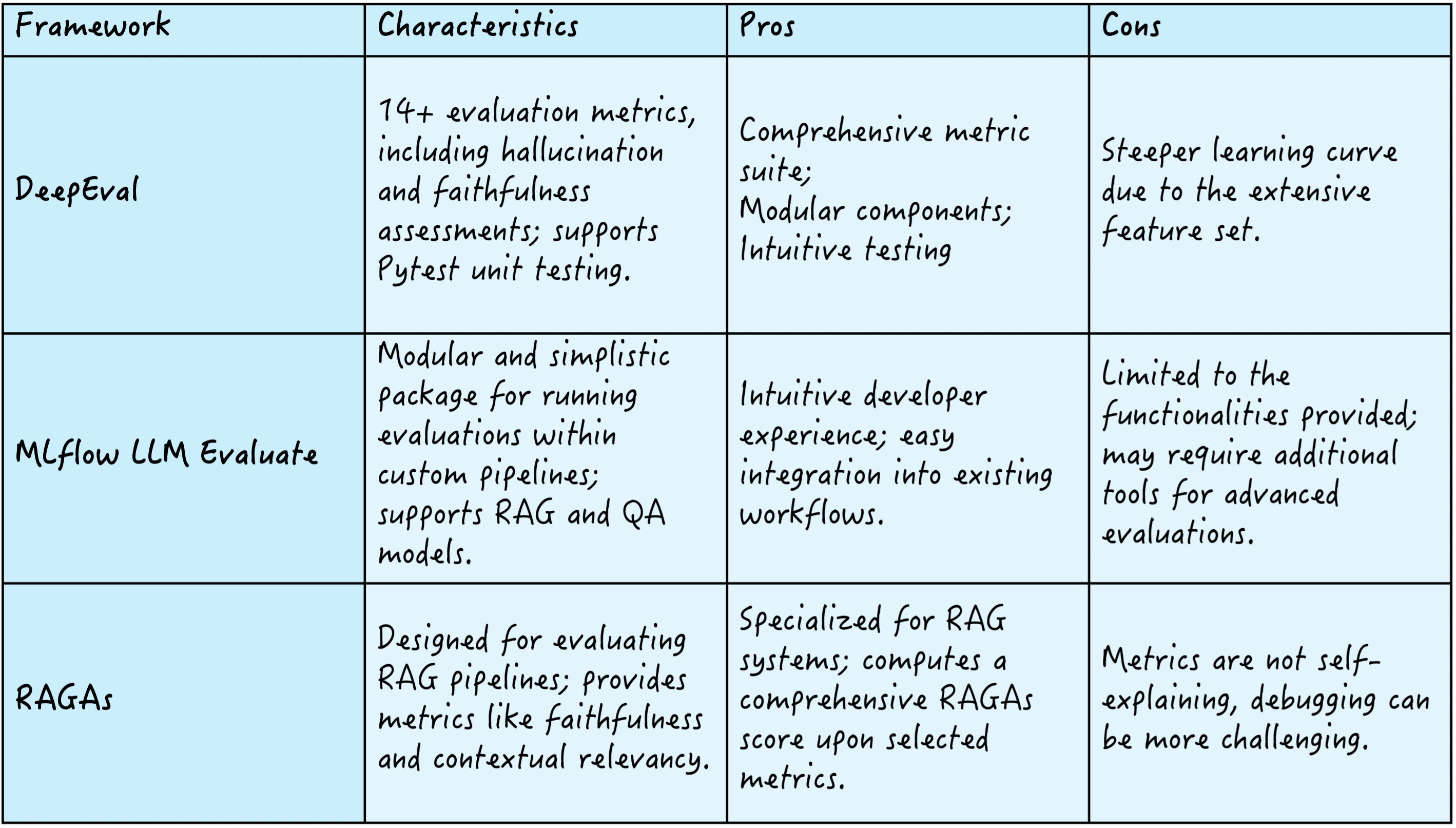
There exist several frameworks to this end, like DeepEval, which offers over 14 evaluation metrics to assess criteria like hallucination and faithfulness; MLflow LLM Evaluate, known for its modularity and simplicity, enabling evaluations within custom pipelines; and RAGAs, which focuses on defining RAG pipelines, providing metrics such as faithfulness and contextual relevancy to compute a comprehensive RAGAs quality score.

Here’s a summary of these three frameworks:
RAG evaluation frameworks

RAG evaluation frameworks

Let’s further examine the latter: RAGAs.

Understanding RAGAs

RAGAs (an abbreviation for retrieval augmented generation assessment) is considered one of the best toolkits for evaluating LLM applications. It succeeds in evaluating the performance of a RAG system’s components &madsh; namely the retriever and the generator in its simplest approach — both in isolation and jointly as a single pipeline.

A core element of RAGAs is its metric-driven development (MDD) approach, which relies on data to make well-informed system decisions. MDD entails continuously monitoring essential metrics over time, providing clear insights into an application’s performance. Besides allowing developers to assess their LLM/RAG applications and undertake metric-assisted experiments, the MDD approach aligns well with application reproducibility.

RAGAs components

  • Prompt object: A component that defines the structure and content of the prompts employed to elicit responses generated by the language model. By abiding with consistent and clear prompts, it facilitates accurate evaluations.
  • Evaluation Sample: An individual data instance that encapsulates a user query, the generated response, and the reference response or ground truth (similar to LLM metrics like ROUGE, BLEU, and METEOR). It serves as the basic unit to assess an RAG system’s performance.
  • Evaluation dataset: A set of evaluation samples used to evaluate the overall RAG system’s performance more systematically, based on various metrics. It aims to comprehensively appraise the system’s effectiveness and reliability.

RAGAs Metrics

RAGAs offers the capability of configuring your RAG system metrics, by defining the specific metrics for the retriever and the generator, and blending them into an overall RAGAs score, as depicted in this visual example:

RAGAs score

RAGAs score | Image credits: RAGAs documentation

Let’s navigate some of the most common metrics in the retrieval and generation sides of things.

Retrieval performance metrics:

  • Contextual recall: The recall measures the fraction of relevant documents retrieved from the knowledge base across the ground-truth top-k results, i.e., how many of the most relevant documents to answer the prompt have been retrieved? It is calculated by dividing the number of relevant retrieved documents by the total number of relevant documents.
  • Contextual precision: Within the retrieved documents, how many are relevant to the prompt, instead of being noise? This is the question answered by contextual precision, which is computed by dividing the number of relevant retrieved documents by the total number of retrieved documents.

Generation performance metrics:

  • Faithfulness: It evaluates whether the generated response aligns with the retrieved evidence, in other words, the response’s factual accuracy. This is usually done by comparing the response and retrieved documents.
  • Contextual Relevancy: This metric determines how relevant the generated response is to the query. It is typically computed either based on human judgment or via automated semantic similarity scoring (e.g., cosine similarity).

As an example metric that bridges both aspects of a RAG system — retrieval and generation — we have:

  • Context utilization: This evaluates how effectively an RAG system utilizes the retrieved context to generate its response. Even if the retriever fetched excellent context (high precision and recall), poor generator performance may fail to use it effectively, context utilization was proposed to capture this nuance.

In the RAGAs framework, individual metrics are combined to calculate an overall RAGAs score that comprehensively quantifies the RAG system’s performance. The process to calculate this score entails selecting relevant metrics and calculating them, normalizing them to move in the same range (normally 0-1), and computing a weighted average of the metrics. Weights are assigned depending on each use case’s priorities, for instance, you might want to prioritize faithfulness over recall for systems requiring strong factual accuracy.

More about RAGAs metrics and their calculation through Python examples can be found here.
 

Wrapping Up

 
This article introduces and provides a general understanding of RAGAs: a popular evaluation framework to systematically measure several aspects of RAG systems performance, both from an information retrieval and text generation standpoint. Understanding the key elements of this framework is the first step towards mastering its practical use to leverage high-performing RAG applications.

A Practical Guide to Deploying Machine Learning Models


A Practical Guide to Deploying Machine Learning Models

Image by Author
A Practical Guide to Deploying Machine Learning Models

As a data scientist, you probably know how to build machine learning models. But it’s only when you deploy the model that you get a useful machine learning solution. And if you’re looking to learn more about deploying machine learning models, this guide is for you.

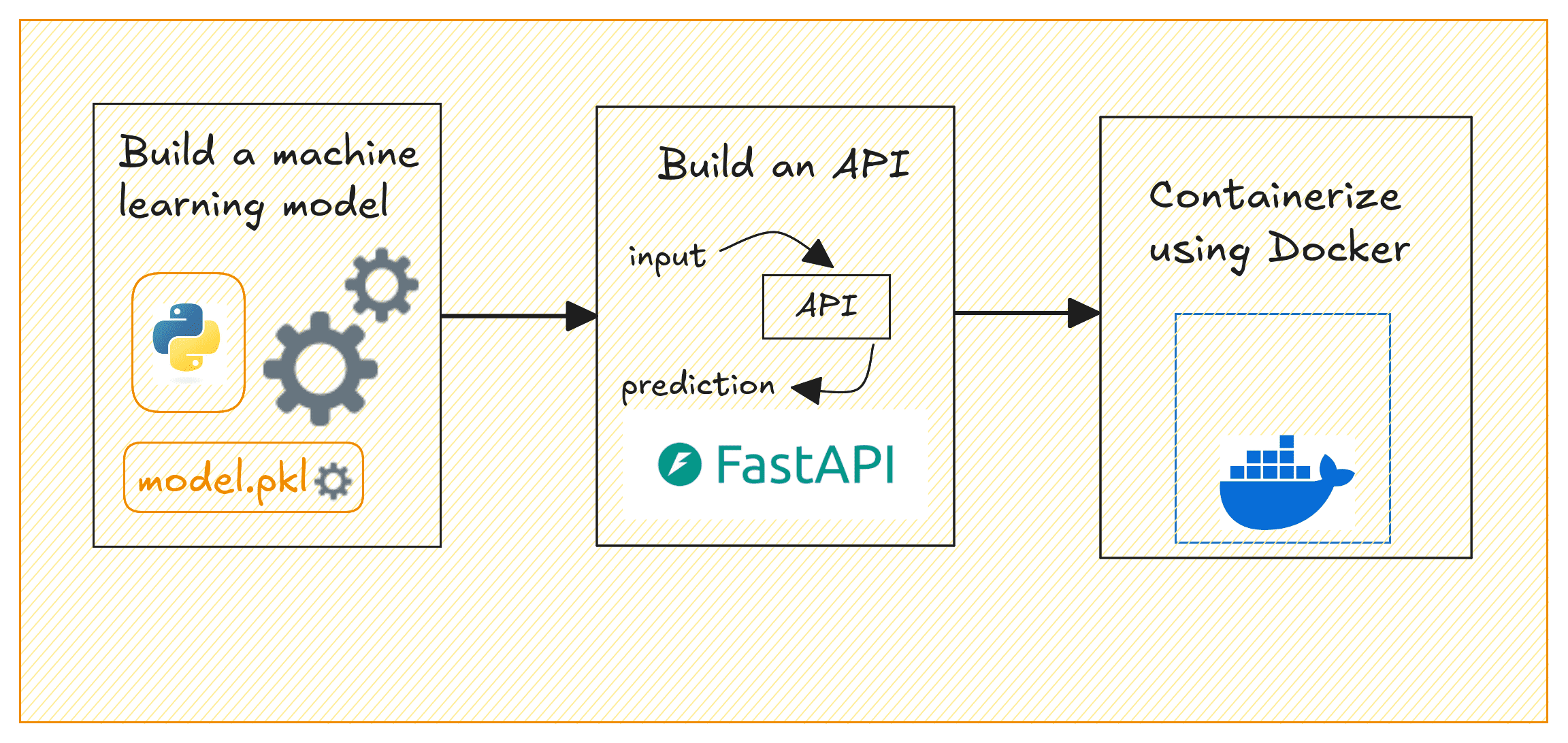
The steps involved in building and deploying ML models can typically be summed up like so: building the model, creating an API to serve model predictions, containerizing the API, and deploying to the cloud.

This guide focuses on the following:

  • Building a machine learning model with Scikit-learn
  • Creating a REST API to serve predictions from the model using FastAPI
  • Containerizing the API using Docker
deploy-ml-models

Deploying ML Models | Image by Author

We’ll build a simple regression model on the California housing dataset to predict house prices. By the end, you’ll have a containerized application that serves house price predictions based on selected input features.

Setting Up the Project Environment

Before you start, make sure you have the following installed:

  • A recent version of Python (Python 3.11 or later preferably)
  • Docker for containerization; Get Docker for your operating system

⚙️ To follow along comfortably, it’s helpful to have a basic understanding of building machine learning models and working with APIs.


Getting Started

Here’s the (recommended) structure for the project’s directory:

We’ll need a few Python libraries to get going. Let’s install them all next.

In your project environment, create and activate a virtual environment:

For the project we’ll be working on, we need pandas and scikit-learn to build the machine learning model. And FastAPI and Uvicorn to build the API to serve the model’s predictions.

So let’s install these required packages using pip:

You can find all the code for this tutorial on GitHub.

Building a Machine Learning Model

Now, we’ll train a linear regression model using the California Housing dataset which is built into scikit-learn. This model will predict house prices based on the selected features. In the project directory, create a file called model_training.py:

This script loads the California housing dataset, selects three features (MedInc, AveRooms, AveOccup), trains a linear regression model, and saves it in the model/ folder as linear_regression_model.pkl.

Note: To keep things simple, we’ve only used a small subset of features. But you can try adding more.

Run the script to train the model and save it:

You’ll get the following message and should be able to find the .pkl file in the model/ directory:

Creating the FastAPI App

We’ll now create an API that serves predictions using FastAPI.

Inside the app/ folder, create two files: __init__.py (empty) and main.py. We do this because we’d like to containerize the FastAPI app using Docker next.

In main.py, write the following code:

This FastAPI application exposes a /predict endpoint that takes three features (MedInc, AveRooms, AveOccup). It uses the trained model to predict house prices, and returns the predicted price.

Containerizing the App with Docker

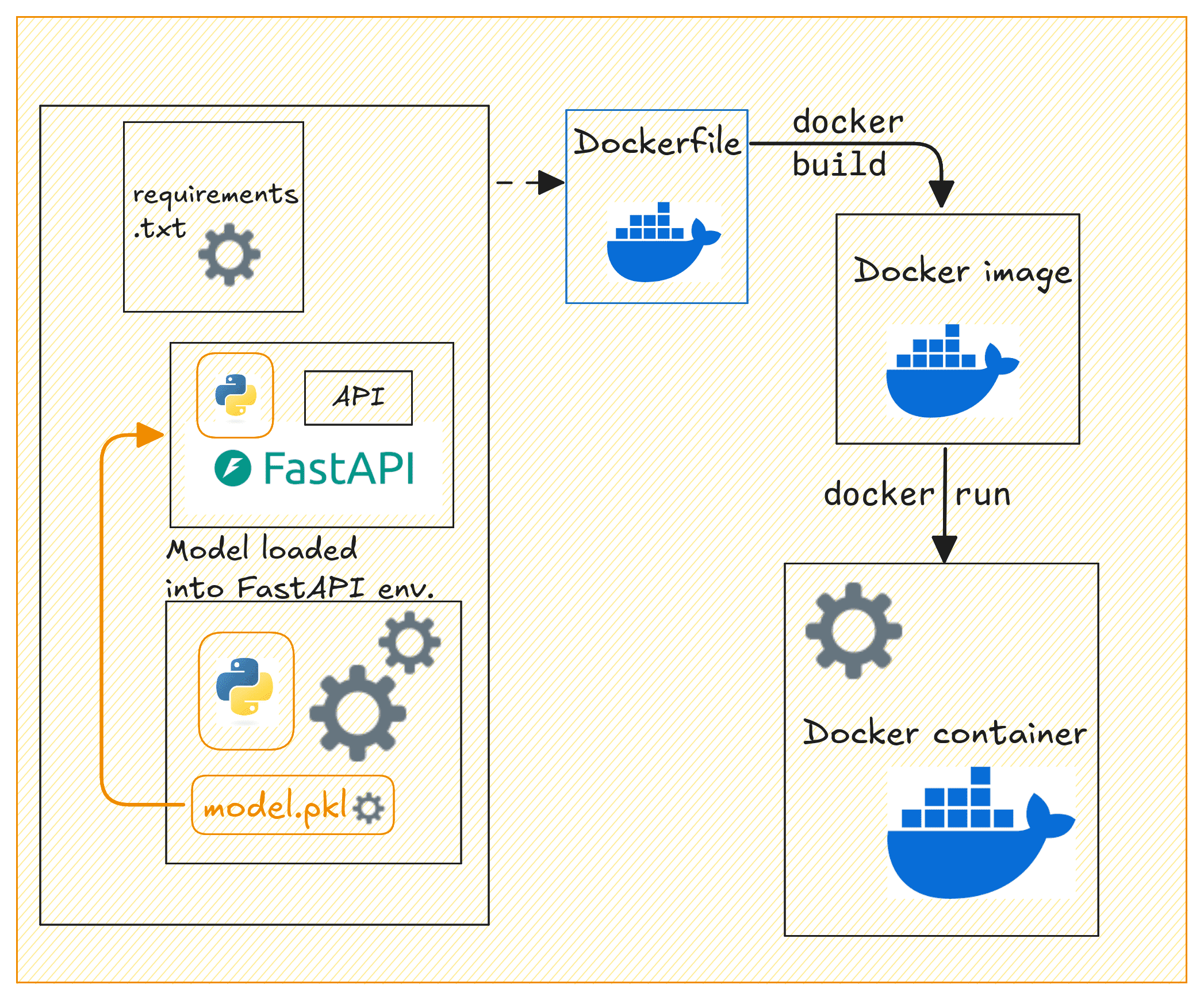
Now let’s containerize our FastAPI application. In the project’s root directory, create a Dockerfile and a requirements.txt file.

Creating the Dockerfile

Let’s create a Dockerfile:

This creates a lightweight container for a FastAPI application using Python 3.11 (slim version) as the base image. It sets the working directory to /code, copies the requirements.txt file into the container, and installs the necessary Python dependencies without caching.

The FastAPI app and model files are then copied into the container. Port 80 is exposed for the application, and Uvicorn is used to run the FastAPI app. This makes the API accessible at port 80. This setup is efficient for deploying a FastAPI app in a containerized environment.

Creating the requirements.txt File

Create a requirements.txt file listing all dependencies:

Building the Docker Image

Now that we have the Dockerfile, requirements.txt, and the FastAPI app ready, let’s build a Docker image and run the container.

Dockerizing the API

Dockerizing the API | Image by Author

Build the Docker image by running the following docker build command:

Next run the Docker container:

Your API should now be running and accessible at http://127.0.0.1:80.

You can use curl or Postman to test the /predict endpoint by sending a POST request. Here’s an example request:

This should return a response with the predicted house price, like this:

Tagging and Pushing the Docker Image to Docker Hub

After building the Docker image, running the container, and testing it. You can now push it to Docker Hub for easier sharing and deploying to cloud platforms.

First, login to Docker Hub:

You’ll be prompted to enter the credentials.

Tag the Docker image:

Replace your_username with your Docker Hub username.

Note: It also makes sense to add versions to your model files. When you update the model, you can rebuild the image with a new tag, and push the updated image to Docker Hub.

Push the image to Docker Hub:

Other developers can now pull and run the image like so:

Anyone with access to your Docker Hub repository can now pull the image and run the container.

Wrap-up and Next Steps

Here’s a quick review of what we did in this tutorial:

  • Train a machine learning model using scikit-learn
  • Build a FastAPI application to serve predictions
  • Containerize the application with Docker

We also looked at pushing the Docker image to Docker Hub for easier distribution. The next logical step is to deploy this containerized application to the cloud.

And for this, you can use services like AWS ECS, GCP, or Azure to deploy the API in a production environment. Let us know if you’d like a tutorial on deploying machine learning models to the cloud.

Happy deploying!

References and Further Reading

Connect broadband

Why do governments, corporations, and experts promote eggs, meat, and other animal foods?

  Your question combines nutrition, public policy, ethics, religion, psychology, and AI. It's useful to separate evidence-based facts ...