
A Practical Guide to Building Local RAG Applications with Langchain
Image by Author | Ideogram
Retrieval augmented generation (RAG) encompasses a family of systems that extend conventional language models, large and otherwise (LLMs), to incorporate context based on retrieved knowledge from a document base, thereby leading to more truthful and relevant responses being generated upon user queries.
In this context, LangChain attained particular attention as a framework that simplifies the development of RAG applications, providing orchestration tools for integrating LLMs with external data sources, managing retrieval pipelines, and handling workflows of varying complexity in a robust and scalable manner.
This article provides a practice step-by-step guide to building a very simple local RAG application with LangChain, defining at each step the key components needed. To navigate you through this process, we will be using Python. This article is intended to be an introductory practical resource that supplements the RAG foundations covered in the Understanding RAG series. If you are new to RAG and looking for a gentle theoretical background, we recommend you check out this article series first!
Step-by-Step Practical Guide
Let’s get our hands dirty and learn how to build our first local RAG system with Langchain by coding. For reference, the following diagram taken from Understanding RAG Part II shows a simplified version of a basic RAG system and its core components, which we will build by ourselves.
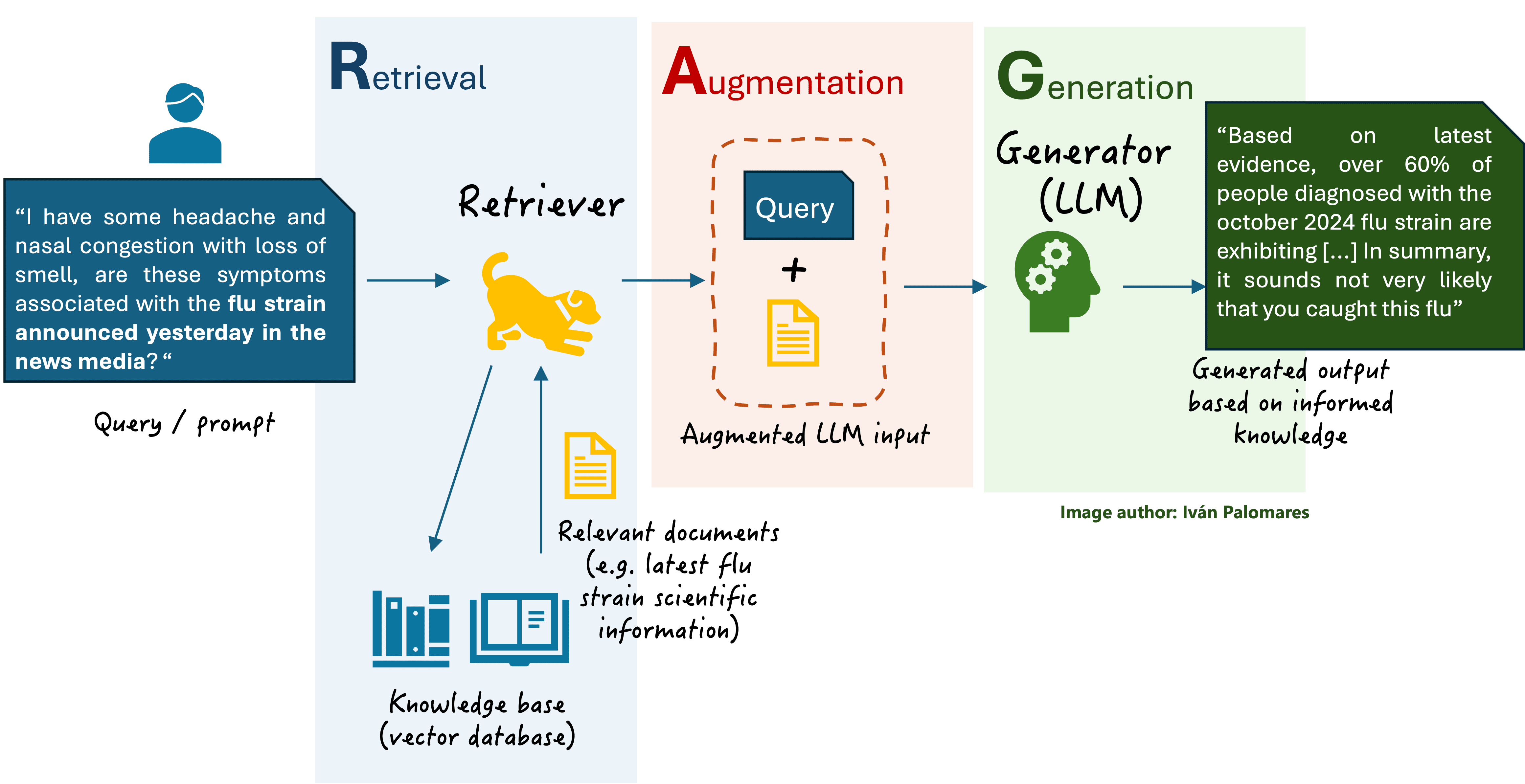
A basic RAG scheme
First, we install the necessary libraries and frameworks. The latest versions of LangChain may require langchain-community, hence it is also being installed. FAISS is a framework for efficient similarity search in a vector database. For loading and using existing LLMs, we will resort to Hugging Face’s transformers and sentence-transformers libraries, the latter of which provides pre-trained models optimized for text embeddings at sentence level. You may or may not need the latter, depending on the specific Hugging Face model you are going to use.
First we will install the libraries outlined above.
Next, we add the necessary imports to start coding.
The first element we need is a knowledge base, implemented as a vector database. This stores the text documents that will be used by the RAG system for context retrieval, and information is typically encoded as vector embeddings. We will use a small collection of nine short text documents describing several destinations in Eastern and Southeast Asia. The dataset is available in a compressed .zip file here. The code below locally downloads the dataset, decompresses it and extracts the text files.
Now that we have a “raw” knowledge base of text documents, we need to split the whole data into chunks and transform them into vector embeddings.
Chunking in RAG systems is important because LLMs have token limitations, and efficient retrieval of relevant information requires splitting documents into manageable pieces while keeping contextual integrity, which is crucial for adequate response generation by the LLM later on.
Regarding documents transformation into chunks into a suitable vector database for our RAG application, FAISS will look after efficiently storing and indexing the vector embeddings, enabling accurate and efficient similarity-based search. The as_retriever() method facilitates integration with LangChain’s retrieval methods, so that relevant document chunks can be retrieved dynamically to optimize the LLM’s responses. Notice that for creating embeddings we are using a Hugging Face model trained for this task, concretely all-MiniLM-L6-v2.
We just initialized one of our key RAG components at the end of the previous code excerpt: the retriever. To make it fully functional, of course, we need to start gluing the rest of the RAG pieces together.
Below, we fully unleash LangChain’s orchestration capabilities. The following code first defines an LLM pipeline for text generation using Hugging Face’s Transformers library and the GPT-2 model.
The device=0 argument ensures the model runs on a GPU (if available), significantly improving inference speed. If you are running this code on a notebook, we suggest keeping it as is. The max_new_tokens argument is important to control the length of the generated response, preventing excessively long or truncated outputs while maintaining coherence. Try playing with its value later to see how it affects the quality of the generated outputs.
Things get increasingly exciting below. Next, we define a prompt template, i.e. a structured and formatted prompt that incorporates the retrieved context dynamically, ensuring the model generates responses grounded in relevant knowledge. This step aligns with the Augmentation block in the previously discussed RAG architecture.
We then define an LLM chain, a key LangChain component that orchestrates the interaction between the LLM and the prompt template that will contain the augmented input and ensure a structured query-response flow.
Last but not least, we initialize an object for Question-Answering (QA) using the RetrievalQA class. In LangChain, specifying the type of target language task after having created the chain is key to define an application suited to that particular task, for instance, question-answering. The aforesaid class links the retriever with the LLM chain. Now, we have all the RAG building blocks glued together!
We are nearly done and almost ready to try our RAG application. Just one more step to define a supporting function that will ensure the augmented context is kept within the LLM’s specified token limit, truncating the input when needed.
Time to try our RAG system with a question about Asian cuisine. Let’s see how it behaves (note, keep expectations not too high, remember we are dealing with smaller and manageable pre-trained models for learning purposes. Don’t expect a ChatGPT-like output quality here!). You can try later changing the number of top K retrieved documents to use in augmentation, by replacing the value of 1 in the commented line below by a value of 2 or more.
This is a sample response:
Question: What are the best Asian cuisine dishes?
Helpful Answer: Many people have an urge to drink their “sour” (sour food) in order to get good results. This includes many popular Asian dishes, including spicy-spicy rice, pinto beans, soy sauce, and more. Many Asian food companies have been using sweet (a combination of soy sauce, sour cream, and a combination of watermelon, cabbage, and ginger) as the primary components, which has led to many people enjoying traditional Chinese, Japanese, and Vietnamese meals that can be delicious.
Vietnamese food tends to be more appealing and more appealing to Vietnamese students and professionals who want to learn about the country, and may want to take the time to study and/or take courses for an A+ or above.
Japanese cuisine is a mixed bag. The most popular dishes in Japanese cuisine tend to be fried rice (鼘雅), fried vegetables (鞊雅) and seaweed (雅枊), but other…
Not too bad. There may have been a bit of inconsistent blends of information in some parts of the text, but overall we can see how the system made a decent use of retrieved information from our original dataset of text documents, together with the humble, limited capabilities of GPT-2, largely influenced by the general-purpose dataset it has been trained upon.
Wrapping Up
We have taken a gentle hands-on introductory look at building your first RAG application locally, relying on LangChain for orchestrating its main components, mainly the retriever and the language model. Using these steps and techniques to build your own local RAG application suited to your specifications, the sky’s the limit.






No comments:
Post a Comment