We have previously seen how to train the Transformer model for neural machine translation. Before moving on to inferencing the trained model, let us first explore how to modify the training code slightly to be able to plot the training and validation loss curves that can be generated during the learning process.
The training and validation loss values provide important information because they give us a better insight into how the learning performance changes over the number of epochs and help us diagnose any problems with learning that can lead to an underfit or an overfit model. They will also inform us about the epoch with which to use the trained model weights at the inferencing stage.
In this tutorial, you will discover how to plot the training and validation loss curves for the Transformer model.
After completing this tutorial, you will know:
- How to modify the training code to include validation and test splits, in addition to a training split of the dataset
- How to modify the training code to store the computed training and validation loss values, as well as the trained model weights
- How to plot the saved training and validation loss curves
Tutorial Overview
This tutorial is divided into four parts; they are:
- Recap of the Transformer Architecture
- Preparing the Training, Validation, and Testing Splits of the Dataset
- Training the Transformer Model
- Plotting the Training and Validation Loss Curves
Prerequisites
For this tutorial, we assume that you are already familiar with:
- The theory behind the Transformer model
- An implementation of the Transformer model
- Training the Transformer model
Recap of the Transformer Architecture
Recall having seen that the Transformer architecture follows an encoder-decoder structure. The encoder, on the left-hand side, is tasked with mapping an input sequence to a sequence of continuous representations; the decoder, on the right-hand side, receives the output of the encoder together with the decoder output at the previous time step to generate an output sequence.
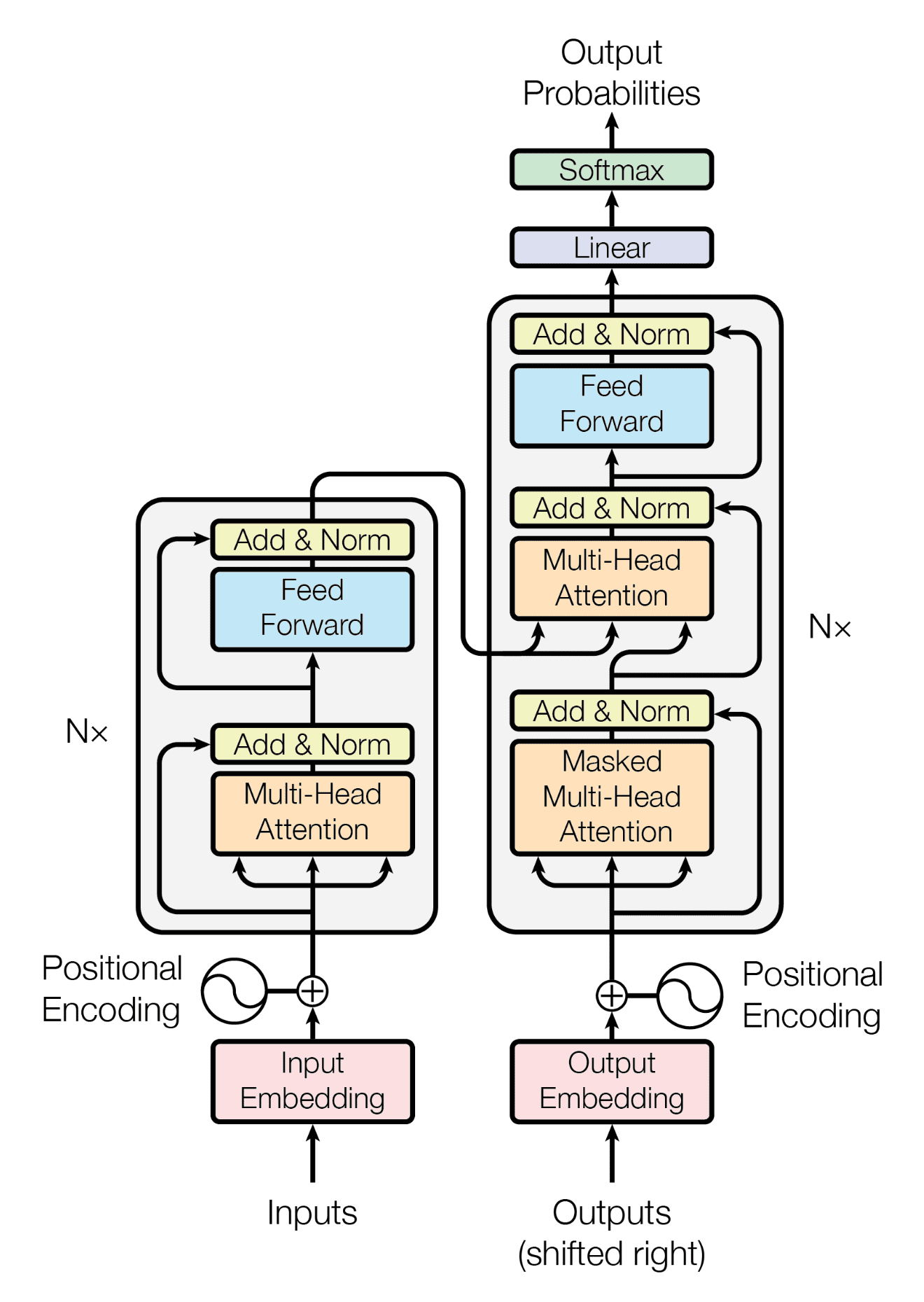
The encoder-decoder structure of the Transformer architecture
Taken from “Attention Is All You Need“
In generating an output sequence, the Transformer does not rely on recurrence and convolutions.
You have seen how to train the complete Transformer model, and you shall now see how to generate and plot the training and validation loss values that will help you diagnose the model’s learning performance.
Preparing the Training, Validation, and Testing Splits of the Dataset
In order to be able to include validation and test splits of the data, you will modify the code that prepares the dataset by introducing the following lines of code, which:
- Specify the size of the validation data split. This, in turn, determines the size of the training and test splits of the data, which we will be dividing into a ratio of 80:10:10 for the training, validation, and test sets, respectively:
- Split the dataset into validation and test sets in addition to the training set:
- Prepare the validation data by tokenizing, padding, and converting to a tensor. For this purpose, you will collect these operations into a function called
encode_pad, as shown in the complete code listing below. This will avoid excessive repetition of code when performing these operations on the training data as well:
- Save the encoder and decoder tokenizers into pickle files and the test dataset into a text file to be used later during the inferencing stage:
The complete code listing is now updated as follows:
Training the Transformer Model
We shall introduce similar modifications to the code that trains the Transformer model to:
- Prepare the validation dataset batches:
- Monitor the validation loss metric:
- Initialize dictionaries to store the training and validation losses and eventually store the loss values in the respective dictionaries:
- Compute the validation loss:
- Save the trained model weights at every epoch. You will use these at the inferencing stage to investigate the differences in results that the model produces at different epochs. In practice, it would be more efficient to include a callback method that halts the training process based on the metrics that are being monitored during training and only then save the model weights:
- Finally, save the training and validation loss values into pickle files:
The modified code listing now becomes:
Plotting the Training and Validation Loss Curves
In order to be able to plot the training and validation loss curves, you will first load the pickle files containing the training and validation loss dictionaries that you saved when training the Transformer model earlier.
Then you will retrieve the training and validation loss values from the respective dictionaries and graph them on the same plot.
The code listing is as follows, which you should save into a separate Python script:
Running the code above generates a similar plot of the training and validation loss curves to the one below:

Line plots of the training and validation loss values over several training epochs
Note that although you might see similar loss curves, they might not necessarily be identical to the ones above. This is because you are training the Transformer model from scratch, and the resulting training and validation loss values depend on the random initialization of the model weights.
Nonetheless, these loss curves give us a better insight into how the learning performance changes over the number of epochs and help us diagnose any problems with learning that can lead to an underfit or an overfit model.
For more details on using the training and validation loss curves to diagnose the learning performance of a model, you can refer to this tutorial by Jason Brownlee.
Further Reading
This section provides more resources on the topic if you are looking to go deeper.
Books
Papers
Websites
- How to use Learning Curves to Diagnose Machine Learning Model Performance, https://machinelearningmastery.com/learning-curves-for-diagnosing-machine-learning-model-performance/
Summary
In this tutorial, you discovered how to plot the training and validation loss curves for the Transformer model.
Specifically, you learned:
- How to modify the training code to include validation and test splits, in addition to a training split of the dataset
- How to modify the training code to store the computed training and validation loss values, as well as the trained model weights
- How to plot the saved training and validation loss curves
Do you have any questions?
Ask your questions in the comments below, and I will do my best to answer.






No comments:
Post a Comment