Product

Thursday, 22 June 2023

Add a text summarizer to Google Docs using Natural Language Processing Cloud's Text Summarization API

 Whether you’re a writer, data scientist or just skimming through sources to get a job done, reading longer texts to pluck out crumbs of information can be quite exhausting. Automating such elements of your work allows you to focus on the creative side of things.
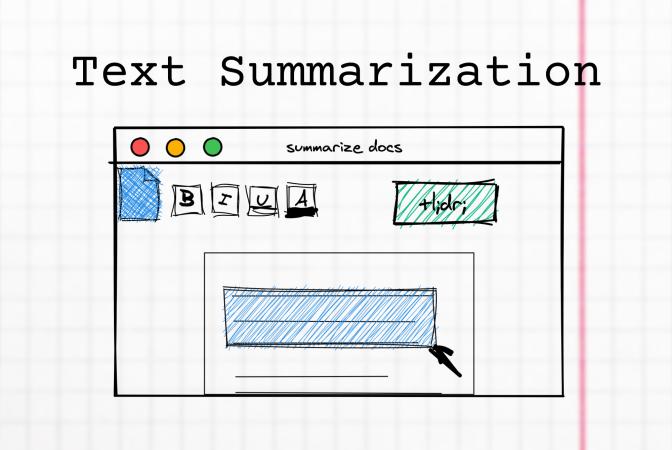
Text Summarization
Unless stated otherwise, all pictures in the article are by the author.

Text Summarization

Text summarization is the technique of extracting key informational elements of a voluminous text. Manual text summarization is a difficult and time-expensive task, so Natural Language Processing and machine learning algorithms became popular to automate it.

There are ready-made solutions on the market, whether in the form of libraries or ready-made tools for end-users.

In this article, we will prepare our own tailored solution, which at the same time does not require advanced knowledge of data science.

NLP Cloud

NLP Cloud is a provider of multiple APIs for text processing using machine learning models. One of these is the text summarizer, which looks promising in terms of simple implementation.

The summarizer provided by NLP Cloud is abstractive, which means that new sentences might be generated and parts with low information-noise ratio are removed.

Let's see an example:
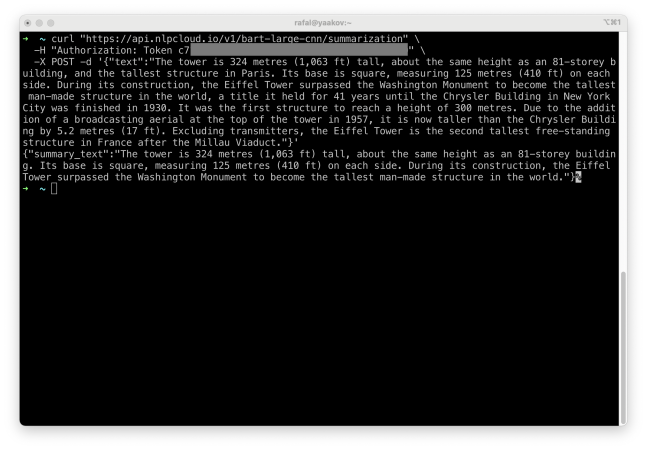
Text Summarization API

We pass a block of text, and the model returns a summary. But operating in a console is not very convenient. So, let’s make Google Docs summarize the selected text fragment this way.

Extending Google Docs

Our goal is to create a convenient menu so that text summarization happens automatically from within Google Docs.
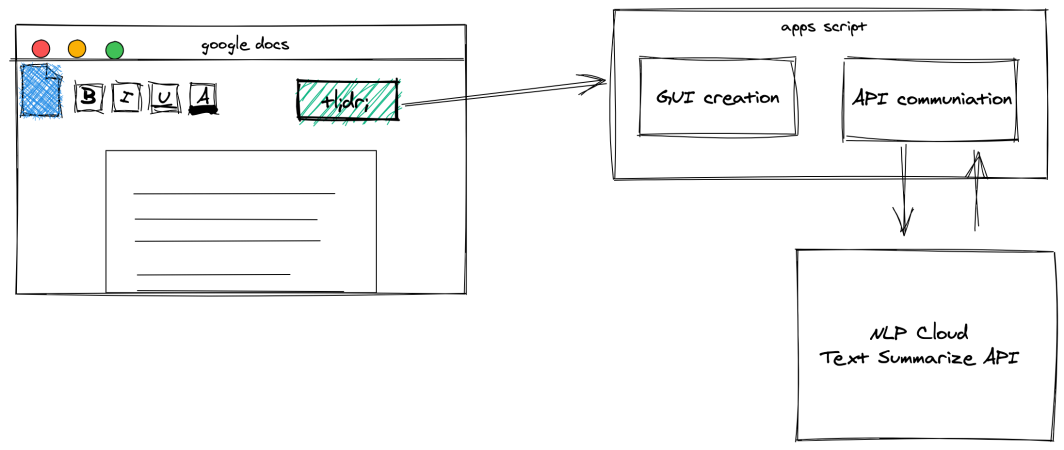
Apps Script Project Structure

This is how our project is structured. Using Apps Script, we will extend the GUI with a button that will trigger functions that communicate with the NLP Cloud API and then insert the result below.

We will start by preparing an add-on for the menu.

Making Menu

Using Google Apps Scripts to adding custom functionalities to Google Docs is fairly easy. You can customize the user interface with new menus, dialog boxes and sidebars. To create a script, after opening Google Docs, select Tools -> Script editor.

All the interface elements should be added in this function: onOpen. It is run after opening the document and allows us to add the menu.

function onOpen() {
    var ui = DocumentApp.getUi();
    
    ui.createMenu('Text Summarizer')
        .addItem('Summarize selection', 'summarizeSelection')
        .addToUi();
    }
    
    function summarizeSelection() {
    // summarization function
}

After saving script and refreshing Docs, you should find new menu element “Text Summarizer”.
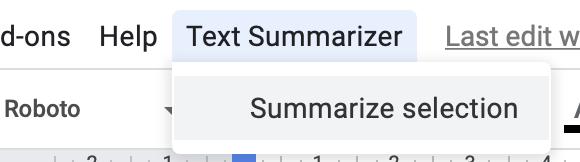
Google Docs Menu

We must get the selected text and then implement the following function: summarizeSelection.

Get Selection

The tricky part is getting currently selected text and passing it to functions. It is possible thanks to this function: getSelection.

DocumentApp.getActiveDocument().getSelection();

However, this function returns not only highlighted part of the documents, but a whole paragraph in which selections resides. That’s why we create more complex getSelectedText function:

function getSelectedText() {
var document = DocumentApp.getActiveDocument();
var body = document.getBody();
var text = "";

var selection = document.getSelection();
var parent = false;
var insertPoint 

if (selection) {
    var elements = selection.getRangeElements();

    if(elements[0].isPartial()) {
    text = elements[0].getElement().asText().getText();
    text = text.substring(elements[0].getStartOffset(),elements[0].getEndOffsetInclusive()+1)
        parent = elements[0].getElement().getParent();
    } else {
    text = elements.map( function(element) {
        parent = element.getElement().getParent();
        return element.getElement().asText().getText(); 
    });
    }
    // Logger.log(text);
    if (parent) {
    insertPoint = body.getChildIndex(parent);
    }
}
return [text, insertPoint];
}

The function simply takes the entire paragraph and trims it down to just the selected fragment. It also returns the index of the paragraph so you know where to insert the summary.

Now, let’s send the text to the API and parse the result.

External APIs

We’ll use the following service to make API requests directly: UrlFetch. Text Summarization API request requires authorization through token. To get it, sign up at nlpcloud.com (the free plan will do just fine).

The API being requested returns a raw JSON response for a request.

Remember that all text processed by this script are sent to external API.

function summarizeSelection() {
    var document = DocumentApp.getActiveDocument();
    var selectedText = getSelectedText();
    var text = selectedText[0];
    var insertPoint = selectedText[1];

    if (text) {
        DocumentApp.getUi().alert(text);
        var url = 'https://api.nlpcloud.io/v1/bart-large-cnn/summarization';

        var response = UrlFetchApp.fetch(
        url, 
        {
            'method': 'POST',
            'contentType': 'application/json',
            'headers':{
            'Authorization': 'Token c714fb961e7f6ef1336ab7f501f4d842f2dc2380'
            },
            'payload': JSON.stringify({"text":text}),
            'muteHttpExceptions': true
        }
        );

        try {
        summary_text = JSON.parse(response.getContentText())['summary_text'];
        DocumentApp.getUi().alert(summary_text);

        } catch (e) {
        DocumentApp.getUi().alert('Something went wrong 🙁');
        }

    } else {
        DocumentApp.getUi().alert('You must select some text!');
    }

}

To test the functionality, just select a text fragment in Docs and choose Text Summarization -> Summarize selection from the Docs menu.

After a moment of processing, you should see a pop-up with the result, which you can even copy.

Text Summary Generation

Writing response to document

Finally, we can insert an API-generated summary directly into the document. For ease of distinction, bold the text of the summary. That’s why the following function also returns the paragraph index of the selected text: getSelectedText.

This way we know exactly where to tell Apps Script to insert the new text.

function summarizeSelection() {
    var document = DocumentApp.getActiveDocument();
    var selectedText = getSelectedText();
    var text = selectedText[0];
    var insertPoint = selectedText[1];
    
    if (text) {
        DocumentApp.getUi().alert(text);
        var url = 'https://api.nlpcloud.io/v1/bart-large-cnn/summarization';
    
        var response = UrlFetchApp.fetch(
        url, 
        {
            'method': 'POST',
            'contentType': 'application/json',
            'headers':{
            'Authorization': 'Token c714fb961e7f6ef1336ab7f501f4d842f2dc2380'
            },
            'payload': JSON.stringify({"text":text}),
            'muteHttpExceptions': true
        }
        );
    
        try {
        summary_text = JSON.parse(response.getContentText())['summary_text'];
        DocumentApp.getUi().alert(summary_text);
    
        } catch (e) {
        DocumentApp.getUi().alert('Something went wrong 🙁');
        }
        //////////////
        var body = document.getBody();
        var summaryParagraph = body.insertParagraph(insertPoint+1, summary_text);
        summaryParagraph.setBold(true);
        //////////////
    } else {
        DocumentApp.getUi().alert('You must select some text!');
    }
    
}

Let’s test the final version:

Takeaways

Building an application that extends Google Docs functionality based on external APIs is an interesting alternative to building large systems to automate inconvenient work steps. Moreover, individual components can be replaced, depending on needs and specific skills. For example, our solution can be extended with emotion detection or text classification (also available in NLP Cloud). You can also prepare your own API or simple functions directly in Apps Script. 

Wednesday, 21 June 2023

Production-Ready Machine Learning Natural Language Processing API for Classification with FastAPI and Transformers

 The first version of FastAPI has been released by the end of 2018 and it's been increasingly used in many applications in production since then (see FastAPI's website). That's what we are using behind the hood at NLP Cloud. It is a great way to easily and efficiently serve our hundreds of Natural Language Processing models, for entity extraction (NER), text classification, sentiment analysis, question answering, summarization... We found that FastAPI is a great way to serve transformer-based deep learning models.

In this article, we thought it would be interesting to show you how we are implementing an Natural Language Processing API based on Hugging Face transformers with FastAPI.

Why Use FastAPI?

Before FastAPI, we had essentially used Django Rest Framework for our Python APIs, but we were quickly interested in FastAPI for the following reasons:

  • • It is very fast
  • • Documentation is very good
  • • The learning curve is quick
  • • The framework can automatically generate API schemas like OpenAPI, which is a good way to document your API but also let external services automatically discover your API
  • • It leverages Pydantic typing validation, which is an excellent way to make the code clearer and less error prone. In a way it makes Python API development very close to what you would get with statically typed languages like Go.

These great performances make FastAPI perfectly suited for machine learning APIs serving transformer-based models like ours.

Install FastAPI

In order for FastAPI to work, we are coupling it with the Uvicorn ASGI server, which is the modern way to natively handle asynchronous Python requests with asyncio. You can either decide to install FastAPI with Uvicorn manually or download a ready-to-use Docker image. Let's show the manual installation first:

pip install fastapi[all]

Then you can start it with:

uvicorn main:app

Sebastián Ramírez, the creator of FastAPI, provides several ready-to-use Docker images that make it very easy to use FastAPI in production. The Uvicorn + Gunicorn + FastAPI image takes advantage of Gunicorn in order to use several processes in parallel (see the image here). In the end, thanks to Uvicorn you can handle several FastAPI instances within the same Python process, and thanks to Gunicorn you can spawn several Python processes.

Your FastAPI application will automatically start when starting the Docker container with the following: docker run.

It is important to properly read the documentation of these Docker images as there are some settings you might want to tweak, like for example the number of parallel processes created by Gunicorn. By default, the image spawns as many processes as the number of CPU cores on your machine. But in case of demanding machine learning models like Natural Language Processing Transformers, it can quickly lead to tens of GBs of memory used. One strategy would be to leverage the Gunicorn option (--preload), in order to load your model only once in memory and share it among all the FastAPI Python processes. Another option would be to cap the number of Gunicorn processes. Both have advantages and drawbacks, but that's beyond the scope of this article.

Simple FastAPI + Transformers API for Text Classification

Text classification is the process of determining what a piece of text is talking about (Space? Business? Food?...). More details about text classification here.

We want to create an API endpoint that performs text classification using the Facebook's Bart Large MNLI model, which is a pre-trained model based on Hugging Face transformers, perfectly suited for text classification.

Our API endpoint will take a piece of text as an input, along with potential categories (called labels), and it will return a score for each category (the higher, the more likely).

We will request the endpoint with POST requests like this:

curl "https://api.nlpcloud.io/v1/bart-large-mnli/classification" \
-H "Authorization: Token e7f6539e5a5d7a16e15" \
-X POST -d '{
    "text":"John Doe is a Go Developer at Google. He has been working there for 10 years and has been awarded employee of the year.",
    "labels":["job", "nature", "space"]
}'

And in return we would get a response like:

{
    "labels": [
        "job",
        "space",
        "nature"
    ],
    "scores": [
        0.9258803129196167,
        0.19384843111038208,
        0.010988432914018631
    ]
}

Here is how to achieve it with FastAPI and Transformers:

from fastapi import FastAPI
from pydantic import BaseModel, constr, conlist
from typing import List
from transformers import pipeline

classifier = pipeline("zero-shot-classification",
                model="facebook/bart-large-mnli")
app = FastAPI()

class UserRequestIn(BaseModel):
    text: constr(min_length=1)
    labels: conlist(str, min_items=1)

class ScoredLabelsOut(BaseModel):
    labels: List[str]
    scores: List[float]

@app.post("/classification", response_model=ScoredLabelsOut)
def read_classification(user_request_in: UserRequestIn):
    return classifier(user_request_in.text, user_request_in.labels)

First things first: we're loading the Facebook's Bart Large MNLI from the Hugging Face repository, and properly initializing it for classification purposes, thanks to Transformer Pipeline:

classifier = pipeline("zero-shot-classification",
                model="facebook/bart-large-mnli")

And later we are using the model by doing this:

classifier(user_request_in.text, user_request_in.labels)

Second important thing: we are performing data validation thanks to Pydantic. Pydantic forces you to declare in advance the input and output format for your API, which is great from a documentation standpoint, but also because it limits potential mistakes. In Go you would do pretty much the same thing with JSON unmarshalling with structs. Here is an easy way to declare that the "text" field should at least have 1 character: constr(min_length=1). And the following specifies that the input list of labels should at list contain one element: conlist(str, min_items=1). This line means that the "labels" output field should be a list of strings: List[str]. And this one means that the scores should be a list of floats: List[float]. If the model returns results that don't follow this format, FastAPI will automatically raise an error.

class UserRequestIn(BaseModel):
    text: constr(min_length=1)
    labels: conlist(str, min_items=1)

class ScoredLabelsOut(BaseModel):
    labels: List[str]
    scores: List[float]

Last of all, the following decorator makes it easy to specify that you only accept POST requests, on a specific endpoint: @app.post("/entities", response_model=EntitiesOut).

More Advanced Data Validation

You can do many more complex validation things, like for example composition. For example, let's say that you are doing Named Entity Recognition (NER), so your model is returning a list of entities. Each entity would have 4 fields: text, type, start and position. Here is how you could do it:

class EntityOut(BaseModel):
    start: int
    end: int
    type: str
    text: str

class EntitiesOut(BaseModel):
    entities: List[EntityOut]

@app.post("/entities", response_model=EntitiesOut) 
# [...]

Until now, we've let Pydantic handle the validation. It works in most cases, but sometimes you might want to dynamically raise an error by yourself based on complex conditions that are not natively handled by Pydantic. For example, if you want to manually return a HTTP 400 error, you can do the following:

from fastapi import HTTPException

raise HTTPException(status_code=400, 
        detail="Your request is malformed")

Of course you can do much more!

Setting the Root Path

If you're using FastAPI behind a reverse proxy, you will most likely need to play with the root path.

The hard thing is that, behind a reverse proxy, the application does not know about the whole URL path, so we have to explicitly tell it which it is.

For example here the full URL to our endpoint might not simply be /classification. But it could be something like /api/v1/classification. We don't want to hardcode this full URL in order for our API code to be loosely coupled with the rest of the application. We could do this:

app = FastAPI(root_path="/api/v1")

Or alternatively you could pass a parameter to Uvicorn when starting it:

uvicorn main:app --root-path /api/v1

Conclusion

I hope we successfully showed you how convenient FastAPI can be for a Natural Language Processing API. Pydantic makes the code very expressive and less error-prone.

FastAPI has great performances and makes it possible to use Python asyncio out of the box, which is great for demanding machine learning models like Transformer-based Natural Language Processing models. We have been using FastAPI for almost 1 year at NLP Cloud and we have never been disappointed so far.

If any question, please don't hesitate to ask, it will be a pleasure to comment!

A beginner’s guide to generative AI and its applications

 Generative AI is a type of artificial intelligence that involves the generation of new data or content based on a set of inputs. This can include creating new images, videos, text, or other forms of data. Generative AI uses machine learning algorithms, such as deep learning, to analyze and learn from existing data in order to generate new, previously unseen content.

Generative AI is a rapidly developing field that has the potential to revolutionize many industries and applications. It has the ability to generate new and creative content, as well as to automate tedious and repetitive tasks. This has many potential benefits, including increased efficiency, productivity, and creativity.

Examples of generative AI

One of the most exciting applications of generative AI is in the field of art and music. AI algorithms, such as DALL-E, have been used to generate new images and paintings that are inspired by existing artworks. This has the potential to create entirely new forms of art, as well as to assist artists in their own creative processes.

In the music industry, generative AI has been used to create original compositions and even entire songs. For example, the music group Tessa Violet recently used the OpenAI music generation model Jukebox to create an entire album of original songs. This has the potential to expand the boundaries of music and to enable the creation of new styles and genres.

Another potential use for generative AI is in language generation, where AI algorithms, such as GPT-3, can be trained to produce natural-sounding text in a variety of styles and formats. This has potential applications in fields such as journalism, where AI could be used to automate the production of articles and reports. It could also be used to assist with tasks such as customer service and technical support, where it could generate responses to common inquiries.

Benefits of generative AI

In addition to its creative applications, generative AI has the potential to provide significant benefits in various fields. For example, it could be used to generate large amounts of data for use in machine learning algorithms, which could improve the accuracy and effectiveness of AI systems. It could also be used to assist with tasks such as product design and engineering, where it could generate new ideas and prototypes for testing and evaluation.

The use of generative AI also has the potential to increase efficiency and productivity in many industries. By automating tedious and repetitive tasks, it could free up human workers to focus on more complex and creative tasks. This could lead to increased innovation and competitiveness in various fields.

The technology behind generative AI

The technology behind generative AI involves the use of machine learning algorithms, such as deep learning, to analyze and learn from existing data. These algorithms are trained on large amounts of data and use a combination of supervised and unsupervised learning techniques to generate new, previously unseen content.

Deep learning algorithms, in particular, have proven to be very effective at generating high-quality content that is difficult for humans to distinguish from real data. For example, the transformer architecture, which is used in many generative AI models, has achieved impressive results in tasks such as language translation and image generation.

Other approaches, such as diffusion models, have also been developed for generating high-quality content. These models use a different type of machine learning algorithm that is able to capture long-range dependencies in data, which allows for the generation of more coherent and consistent content.

Ethical considerations and challenges

However, there are also some ethical considerations and challenges associated with the use of generative AI. For example, there are concerns about the potential for AI algorithms to create content that is biased or discriminatory, or that could be used for nefarious purposes. There are also technical challenges, such as the need to ensure that AI systems are able to generate high-quality content that is coherent and consistent.

Another challenge with generative AI is the potential for it to replace human workers in certain industries. While this could lead to increased efficiency and productivity, it could also result in job losses and social disruption. This is an important issue that will need to be addressed as generative AI technology continues to advance.

Conclusion

In conclusion, generative AI is a rapidly developing field with many potential applications and benefits. While there are some challenges and ethical considerations to be addressed, the future prospects for generative AI are promising, and it is likely to play a significant role in fields such as art, music, and language generation in the coming years. The development of advanced machine learning algorithms, such as transformers and diffusion models, has enabled the creation of highly sophisticated generative AI systems that are able to produce high-quality content. As this technology continues to evolve, we can expect to see even more impressive and creative applications of generative AI in the future.

AI:List the pros and cons when major chief head of political, national,central, state level minister, heads, ceo, prime minister,president are taken control over by the major humanoid leads robotics machines and new work force in specific departments is trained and handled by humanoid robotics irrespective of caste, creed,discrimination - generating various kind of revenue and renewable source of energies and management,streamlining the whole processes in the major 119+ countries of world

 The idea of replacing human leaders with humanoid robotics machines in various governmental positions raises several potential pros and cons:

Pros:

  1. Efficiency: Humanoid robots can potentially execute tasks with greater speed and precision compared to humans, leading to more efficient decision-making and governance processes.

  2. Impartiality: Robots are not influenced by personal biases or emotions, potentially leading to more impartial and fair decision-making, free from considerations like caste, creed, or discrimination.

  3. Consistency: Robots can adhere strictly to predefined rules and protocols, ensuring consistency in policy implementation and enforcement across different regions and time periods.

  4. Productivity: With humanoid robots handling routine administrative tasks, human leaders can focus on strategic planning, policy formulation, and addressing complex issues, leading to increased productivity and innovation.

  5. Transparency: Robots can maintain detailed records of decision-making processes, transactions, and interactions, promoting transparency and accountability in governance.

  6. Safety: In certain high-risk environments or situations, humanoid robots can perform tasks without putting human lives at risk, such as disaster response or hazardous material handling.

Cons:

  1. Loss of Human Touch: Human leaders often provide empathy, intuition, and interpersonal skills that humanoid robots lack, potentially leading to a disconnect between leaders and the people they govern.

  2. Ethical Concerns: Entrusting decision-making authority to robots raises ethical questions regarding accountability, liability, and the potential for misuse or abuse of power.

  3. Job Displacement: The widespread adoption of humanoid robots in governance could lead to job displacement for human workers, particularly in administrative and clerical roles.

  4. Dependency on Technology: Relying too heavily on robotics and automation may create vulnerabilities in governance systems, such as susceptibility to cyberattacks, system failures, or manipulation of algorithms.

  5. Resistance to Change: Implementing such a radical shift in governance structures may face resistance from various stakeholders, including citizens, politicians, and interest groups, who may be skeptical or apprehensive about the implications of humanoid leadership.

  6. Inequality: Despite intentions to eliminate discrimination, the deployment of humanoid robots may inadvertently exacerbate existing socioeconomic inequalities, as access to and control over advanced technology may be concentrated in the hands of certain groups or nations.

  7. Loss of Human Judgment: While robots can follow predetermined rules and algorithms, they may struggle to exercise human judgment, creativity, and adaptability in complex and dynamic situations.

In summary, while the idea of humanoid robots replacing human leaders in governance may offer potential benefits in terms of efficiency, impartiality, and productivity, it also raises significant ethical, social, and practical challenges that must be carefully considered and addressed.

-----------------------------------------------------------------------------------------------------------------------------

## Pros of Humanoid Robot Leadership and Workforce:


* **Efficiency and Speed:**  Robots can work tirelessly and process information much faster than humans, potentially streamlining processes and decision-making.

* **Reduced Bias:**  Humanoid robots wouldn't be susceptible to biases based on race, gender, religion, or other factors, potentially leading to fairer decisions.

* **Enhanced Data Analysis:**  AI-powered robots can analyze vast amounts of data to identify patterns and trends that humans might miss, leading to better policy decisions.

* **24/7 Operations:**  Robots wouldn't require breaks or sleep, allowing for continuous government operations.

* **Dangerous or Repetitive Tasks:**  Robots can handle dangerous or repetitive tasks, freeing up human workers for more creative or strategic roles.


## Cons of Humanoid Robot Leadership and Workforce:


* **Lack of Empathy and Emotional Intelligence:**  Robots struggle to understand and respond to human emotions, which is crucial for effective leadership.

* **Job Displacement:**  Widespread adoption of robot workers could lead to mass unemployment and social unrest.

* **Ethical Concerns:**  The idea of robots controlling governments raises ethical concerns about accountability, transparency, and the potential for misuse.

* **Technological Limitations:**  Current AI and robotics technology isn't sophisticated enough to handle complex political and social issues effectively.

* **Loss of Human Connection:**  Human-to-human interaction is crucial for building trust and social cohesion. Replacing leaders and workforces entirely with robots could lead to a sense of alienation.


## Additional Considerations:


* **Human Oversight:**  Even with AI-powered robots, human oversight and control would likely be necessary to ensure responsible decision-making.

* **Transparency and Public Trust:**  Open communication and clear guidelines would be essential for building public trust in a robot-led government or workforce.

* **Gradual Implementation:**  A gradual transition, integrating robots into specific roles while maintaining human leadership, might be a more realistic approach.

* **Upskilling and Reskilling Programs:**  Governments would need to invest in programs to help displaced workers acquire new skills for the changing job market. 


## Conclusion:


While the concept of robot leadership and workforce holds some potential benefits, the ethical and practical challenges are significant. A balanced approach, focusing on collaboration between humans and robots, is likely the best path forward.  Prioritizing human values and ensuring responsible AI development is crucial in this exploration. 


It's important to remember that the current number of countries in the world is 195. 

-------------------------------------------------------
## Pros of AI and Robotics in Governance:

* **Efficiency and Speed:**  AI and robots can automate tasks, analyze data faster, and streamline processes, potentially leading to more efficient governance.
* **Reduced Bias:**  Humanoid robots wouldn't be susceptible to biases based on race, gender, or other factors, promoting fairer decision-making.
* **24/7 Operations:**  Robots could work tirelessly, potentially improving government responsiveness and service delivery.
* **Enhanced Security:**  AI-powered systems could strengthen border security, improve disaster response, and bolster national defense.

## Cons of AI and Robotics in Governance:

* **Job Displacement:**  Replacing human workers with robots could lead to widespread unemployment and economic disruption.
* **Lack of Accountability:**  Who is responsible for the actions of AI systems? Establishing clear lines of accountability is crucial.
* **Privacy Concerns:**  Extensive data collection and analysis by AI raise privacy concerns and potential misuse of personal information.
* **Ethical Dilemmas:**  AI systems lack human judgment and compassion. Programming ethical decision-making into AI for sensitive situations remains a challenge.
* **Human Control Loss:**  Overreliance on AI could lead to a loss of human control over decision-making processes in government.

## Additional Considerations:

* **Transparency:**  Citizens need to understand how AI systems are used in government and have a say in their development and implementation.
* **Education and Training:**  Equipping people with the skills necessary to work alongside AI is crucial to adapt to a changing workforce.
* **Global Cooperation:**  The ethical implications and governance of AI require international collaboration and consensus.

## Applicability to 119+ Countries:

The applicability of AI and robotics in governance would vary depending on a country's infrastructure, technological development, and cultural context. Developed nations might adopt these technologies faster, while developing countries might face challenges in implementation. 

## Conclusion:

AI and robotics offer potential benefits for governance, but concerns regarding job displacement, bias, privacy, and accountability need to be addressed.  A balanced approach, with human oversight and ethical considerations at the forefront, is essential for responsible integration of these technologies into government structures across the globe.  
---------------------------------------------------
## Pros:

* **Efficiency and Reduced Bias:** Humanoid robots, if sufficiently advanced, could potentially handle tasks with greater efficiency and reduced bias compared to humans. This could lead to faster decision-making, streamlined processes, and fairer allocation of resources. 
* **24/7 Operations:** Robots wouldn't require breaks or sleep, allowing for continuous operation in critical areas like national security or disaster response. 
* **Reduced Risk in Hazardous Environments:** Robots could handle dangerous tasks in areas with extreme temperatures, radiation, or other hazards.
* **Focus on Human Creativity:** By delegating routine tasks to robots, human leaders could focus on strategic planning, innovation, and problem-solving that require creativity and empathy.

## Cons:

* **Loss of Human Control:** Replacing human leaders with robots raises concerns about who controls the robots and their programming. Unethical use of such powerful machines could pose a significant threat. 
* **Job Displacement:** Widespread adoption of robot workers could lead to mass unemployment, creating social unrest and economic instability. 
* **Lack of Empathy and Social Skills:** Robots might struggle with complex negotiations, diplomacy, or situations requiring emotional intelligence and social skills that are crucial for leadership roles.
* **Ethical Considerations:**  Who would be responsible for the actions of these robots?  How would they be programmed to make ethical decisions in complex situations?
* **Technical Challenges:**  Developing and deploying such advanced humanoid robots across 119+ countries would be a massive technological and logistical undertaking.

## Additional Points:

* **Transparency and Accountability:**  Any system involving robot leadership would require extreme transparency and clear lines of accountability to ensure responsible use and prevent misuse.
* **Gradual Integration:**  A more realistic approach might involve a gradual integration of AI and robotics into the decision-making process, with human oversight remaining paramount.
* **Focus on Upskilling:**  Instead of complete job displacement, governments could focus on retraining and upskilling the workforce to adapt to a changing work environment.
* **International Cooperation:**  Global collaboration would be crucial for responsible development, deployment, and regulation of such advanced technologies.


Overall, the concept of robot leadership presents both potential benefits and significant risks. Careful consideration of the ethical, social, and economic implications is essential before such a system could be implemented responsibly. 

Tuesday, 20 June 2023

Guide to Meta OPT-175B – Free GPT-3 Alternative

 OPT-175b is a large language model like GPT-3, created by Meta(Facebook).

It’s available as free and open source – meaning you can run it on your own machines.

You can run OPT-175N AI model without downloading or installing anything and it’s free. To use OPT-175B in the browser,

  1. Open https://opt.alpa.ai/
  2. Enter your prompt in the textbox
  3. Press generate
  4. The results will be displayed below

Installing and running OPT-175b on your own Hardware

You can also run OPT-175B or it’s smaller versions on your own hardware.

Follow the instructions on this page to install and run your own OPT-175B

Monday, 19 June 2023

Generating videos from text prompts using Stable Diffusion

 In this article, methods for generating videos from text prompts using Stable Diffusion AI.

Stable Diffusion lets you create amazing images from text prompts using AI.

Let’s take this concept a bit further and generate videos from text prompts using Stable Diffusion.

Use whichever way you are comfortable with and is suitable for your use case.

  1. Generating Stable Diffusion AI Videos from browser GUI using Google Colab Notebook
  2. Generating Stable Diffusion AI Videos via command line

Let’s go through them one by one.

Generating Stable Diffusion AI Videos from browser GUI using Google Colab Notebook

  1. Open Google Colab Notebook in your browser.
  2. From the top menu bar, select Runtime -> Run All
  3. The notebook will prompt you to login to Hugging Face. Follow the instructions there.

Generating Stable Diffusion AI Videos via command line

To use this method, you need to have Python3 or above installed and should know your way around command line programs.

  1. Download the code from this Github repo
    • There are two ways to do this. You can use either:
      1. Click on the green code button and press Download Zip, or
      2. open your command line application(called Terminal on Mac/Linux or cmd/Powershell on Win) and use the command: git clone git@github.com:nateraw/stable-diffusion-videos.git
    • Both of the above methods will download the code on your local machine. If you used the download zip method, you would need to extract the archive before proceeding further.
  2. From the command line app, change the directory to the extracted code above (cd <folder path>)
  3. Install required Python modules by running the command: pip install -r requirements.txt.If this command gives an error, try pip3 install -r requirements.txt. If you are still seeing errors then you are either not in the correct folder/directory or need to install IP or pip3 on your system.
  4. Run below command to generate a video from a text prompt
python stable_diffusion_walk.py \
--prompts "['earth', 'mars', 'jupiter']" \
--seeds 903,123,42 \
--output_dir dreams \
--name animals_test \
--guidance_scale 8.5 \
--num_steps 5 \
--height 512 \
--width 512 \
--num_inference_steps 50 \
--scheduler klms \
--disable_tqdm \
--make_video \
--use_lerp_for_text \
--do_loop

replace the given prompts with your own. Play around withe settings to see what you can geenrate.

AI on Sperm volume booster food

 There are certain foods that may help increase sperm volume and improve sperm count and motility. Here are some foods that may be beneficial:


Oysters: Oysters are rich in zinc, which is important for healthy sperm production.

Eggs: Eggs are a good source of protein and vitamin E, which is important for sperm health.

Dark chocolate: Dark chocolate contains an amino acid called L-arginine, which can help increase semen volume.

Spinach: Spinach is rich in folic acid, which may help improve sperm count and motility.

Bananas: Bananas are a good source of vitamin B6, which may help regulate hormones involved in sperm production.

Walnuts: Walnuts are rich in omega-3 fatty acids, which may help improve sperm count and motility.

Garlic: Garlic is believed to have aphrodisiac properties and may help improve blood flow to the genital area, which can potentially improve sperm production.

Ginseng: Ginseng is an herb that has been used for centuries to improve sexual function and may help improve sperm quality and quantity.

It is important to note that while these foods may have potential benefits for sperm production and health, they should not be considered a substitute for medical treatments or lifestyle changes that may be recommended by a healthcare provider. Additionally, factors such as age, genetics, and lifestyle habits (such as smoking and excessive alcohol consumption) can also impact sperm volume and health. If a person has concerns about their sperm volume or fertility, they should consult with a healthcare provider.
Connect broadband

Why do governments, corporations, and experts promote eggs, meat, and other animal foods?

  Your question combines nutrition, public policy, ethics, religion, psychology, and AI. It's useful to separate evidence-based facts ...


